

Our verdict: MPC-QT is a good pick if you love the MPC-HC layout but want mpv's modern playback engine underneath. It adds useful extras like multiple playlists and seek previews. Some MPC-HC options are still missing and hidden in the settings.
About MPC-QT
MPC-QT (Media Player Classic Qute Theater) is a community project that reproduces most of the MPC-HC interface and behaviour. Instead of DirectShow filters, it plays video with libmpv, the engine of the mpv player.
Releases use date-based versions: 26.07 means July 2026. Features from MPC-HC that are not implemented yet are hidden or disabled in the options dialog, so the familiar layout is kept.
What it does well
- MPC-HC layout. Familiar menus, options and keyboard shortcuts from Media Player Classic.
- mpv engine. Uses libmpv for playback instead of DirectShow filters and codec packs.
- Multiple playlists. Keeps a separate playlist and last-played position for each show.
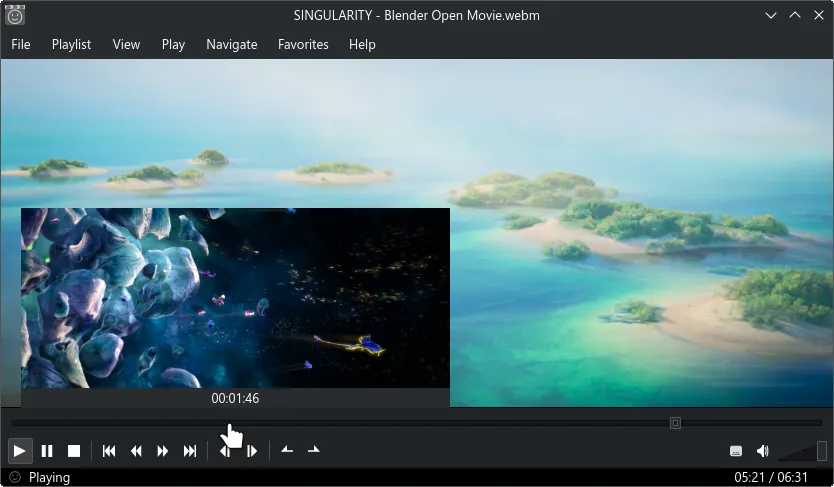
- Seekbar thumbnails. Shows a video preview when you hover over the seek bar.
- Online videos. Plays links from video sites through yt-dlp.
Who it is for
Good fit
MPC-HC fans who want an actively developed player with a modern engine.
Look elsewhere
People who rely on DirectShow filters such as madVR, or who need every MPC-HC option.
Pros and cons
Pros
- Familiar MPC-HC interface
- Modern mpv playback engine
- Multiple playlists and seek previews
- Regular date-based releases
Cons
- Some MPC-HC features are not implemented yet
- No DirectShow filter support
How to install MPC-QT
Download the Windows installer from the official downloads page; a portable zip is also published. Avoid the "continuous" development builds unless you want to test unreleased changes. Online video playback depends on yt-dlp, so keep yt-dlp installed and up to date if you use it.
Questions about MPC-QT
Is MPC-QT free?
Yes. It is open source under the GNU GPL v2.
What is the difference between MPC-QT and MPC-HC?
MPC-QT copies the MPC-HC interface but plays video with libmpv instead of DirectShow, and adds features such as multiple playlists.
Is there a portable MPC-QT?
Yes. Each release includes a portable win-x64 zip alongside the installer.


