

Our verdict: The Nextcloud desktop client is the way to use a Nextcloud server like Dropbox on Windows. It is free and open source, but it is only half of the setup: you need your own server or an account with a Nextcloud provider.
About Nextcloud
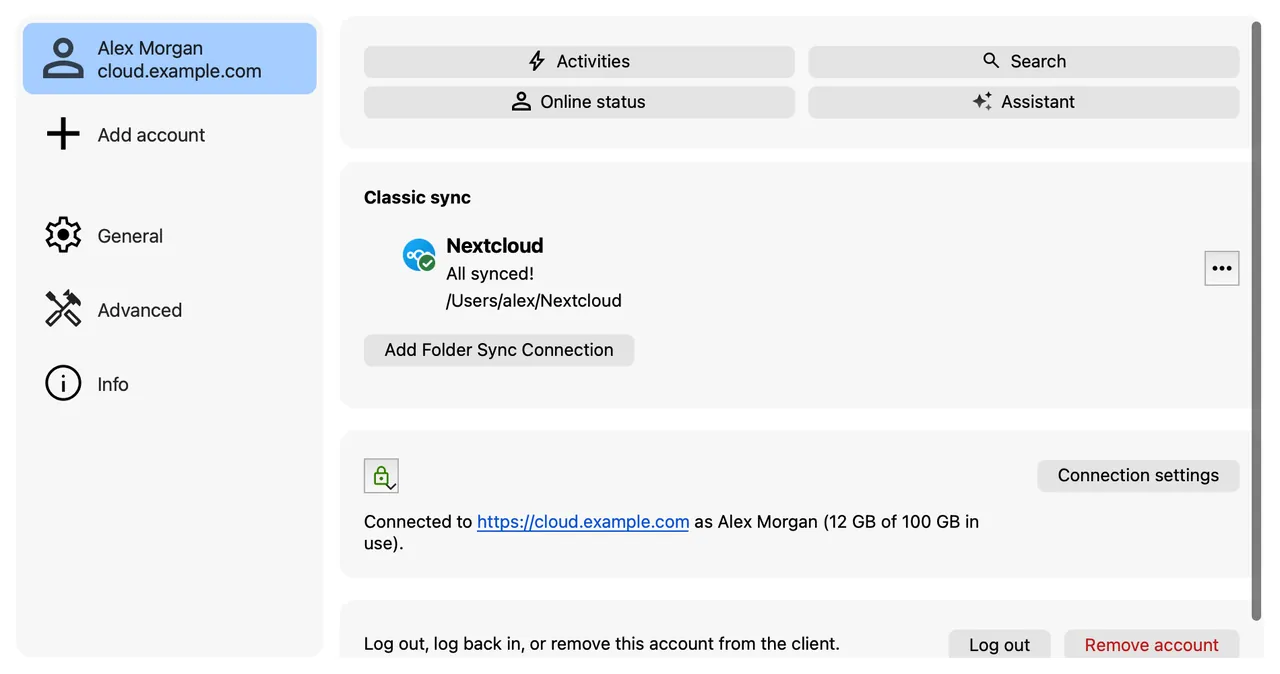
Nextcloud is a self-hosted alternative to Dropbox and Google Drive. The server runs on your own hardware or at a hosting provider, and the desktop client keeps chosen folders on your PC in sync with it.
On Windows the client supports virtual files: everything on the server appears in Explorer, but a file is only downloaded when you open it. You can also pick folders to sync fully, share links from the right-click menu and connect several accounts.
What it does well
- Two-way sync. Changes on the PC and on the server are synced in both directions.
- Virtual files. Shows all server files in Explorer and downloads them only when opened.
- Selective sync. Choose which server folders are kept on this computer.
- Sharing from Explorer. Create share links for files and folders from the right-click menu.
- Multiple accounts. Connect to several Nextcloud servers from one client.
Who it is for
Good fit
People and small teams who run their own Nextcloud server or use a Nextcloud provider and want Dropbox-style sync.
Look elsewhere
Anyone looking for ready-made cloud storage without picking a server or provider first.
Pros and cons
Pros
- Free and open source
- Your files stay on a server you choose
- Files on demand in Explorer
- Works with many hosting providers
Cons
- Needs a Nextcloud server or provider account
- Sync speed and reliability depend on how well the server is maintained
How to install Nextcloud
Install the MSI and sign in with your server address; the client opens a browser window to log in. Decide early between virtual files and full sync for each folder, and exclude very large folders you do not need on this PC.
Questions about Nextcloud
Is Nextcloud free?
Yes. The desktop client and the server software are open source and free. Hosting providers and Nextcloud's enterprise support may charge.
Do I need my own server for Nextcloud?
You need a Nextcloud server, but it does not have to be yours. Many providers offer free or paid accounts, listed on nextcloud.com.
Does the Nextcloud client support files on demand?
Yes. On Windows, virtual files show the whole server in Explorer and download a file only when you open it.


