

Our verdict: PDF Arranger does one job well: rearranging the pages of PDF files visually. It is light, free and open source, but it does not edit text, annotate or run OCR, so pair it with a PDF reader or editor.
About PDF Arranger
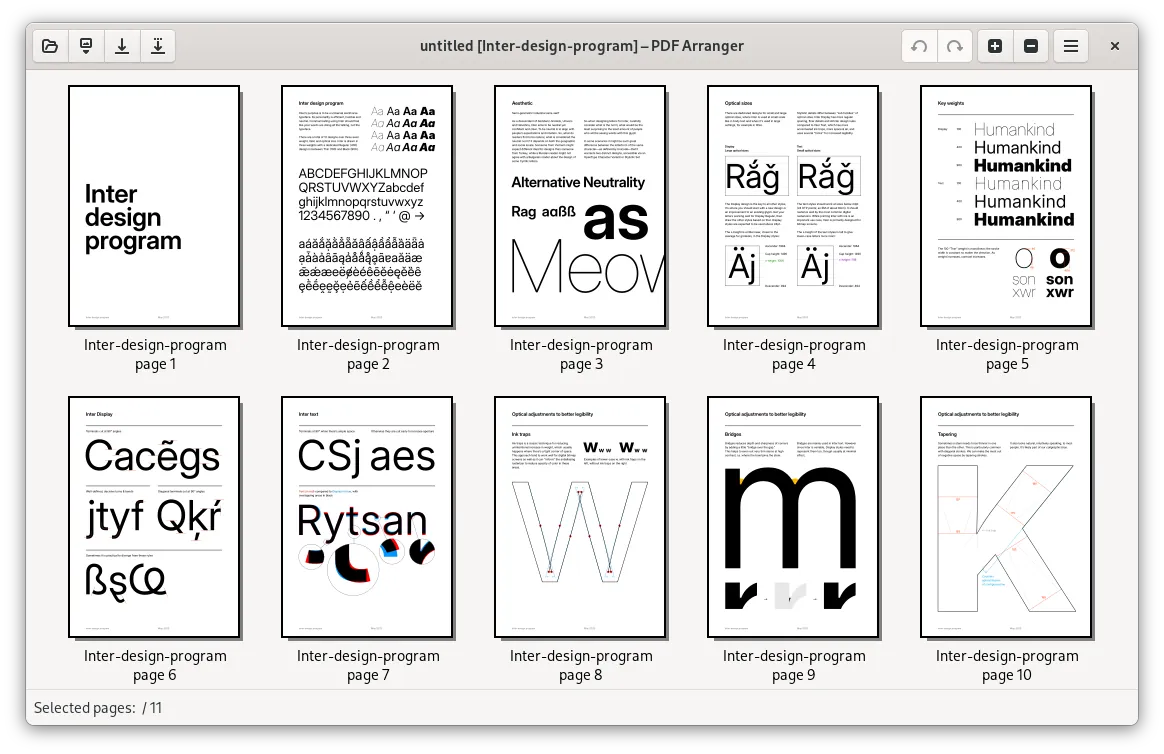
PDF Arranger is a fork of PDF-Shuffler, written in Python with GTK and released under the GNU GPL v3. It works as a graphical front end for the pikepdf library and shows every page of the opened documents as a thumbnail.
You drag thumbnails to reorder pages, delete or duplicate them, rotate and crop them, and import pages from other PDFs to merge files. Selected pages can be exported as a new PDF, which also covers splitting. Image files can also be imported as pages when the img2pdf library is available.
What it does well
- Visual page grid. Every page is shown as a thumbnail that you can drag into a new order.
- Merge and split. Import pages from several PDFs and export any selection as a new file.
- Rotate and crop. Rotate pages in 90-degree steps and crop margins page by page.
- Duplicate and delete. Copy, paste, duplicate or remove pages before saving.
- Edit metadata. Change the document title, author and other PDF properties.
Who it is for
Good fit
Anyone who regularly combines scans, removes pages or fixes page order in PDFs.
Look elsewhere
People who need to edit text, fill forms or annotate PDFs.
Pros and cons
Pros
- Open source and free
- Simple drag-and-drop page editing
- Merges, splits, rotates and crops
- Portable version available
Cons
- No text editing, annotations or OCR
- GTK interface looks out of place on Windows
How to install PDF Arranger
Download the MSI installer from the latest GitHub release; a portable ZIP is also available there. The installer contains everything needed, including the GTK runtime. Open one or more PDFs with File > Open or drag them into the window.
Questions about PDF Arranger
Is PDF Arranger free?
Yes. It is open-source software under the GNU GPL v3 with no paid version.
Can PDF Arranger merge PDF files?
Yes. Open or import several PDFs, arrange the pages and save them as one document.
Is there a portable version?
Yes. Each Windows release has a portable ZIP next to the MSI installer.


