

Our verdict: PhotoDemon packs a surprisingly complete photo editor into a 22 MB portable download. Layers, adjustment tools, RAW and PSD support plus macros and batch processing cover most everyday editing. It is Windows-only and, as a 32-bit app, cannot handle images larger than about 2 GB.
About PhotoDemon
PhotoDemon is written by Tanner Helland with contributors and released under a permissive BSD license. It needs no installation: you unzip it and run it, even from a USB stick, and it leaves nothing behind except a temporary folder you can choose.
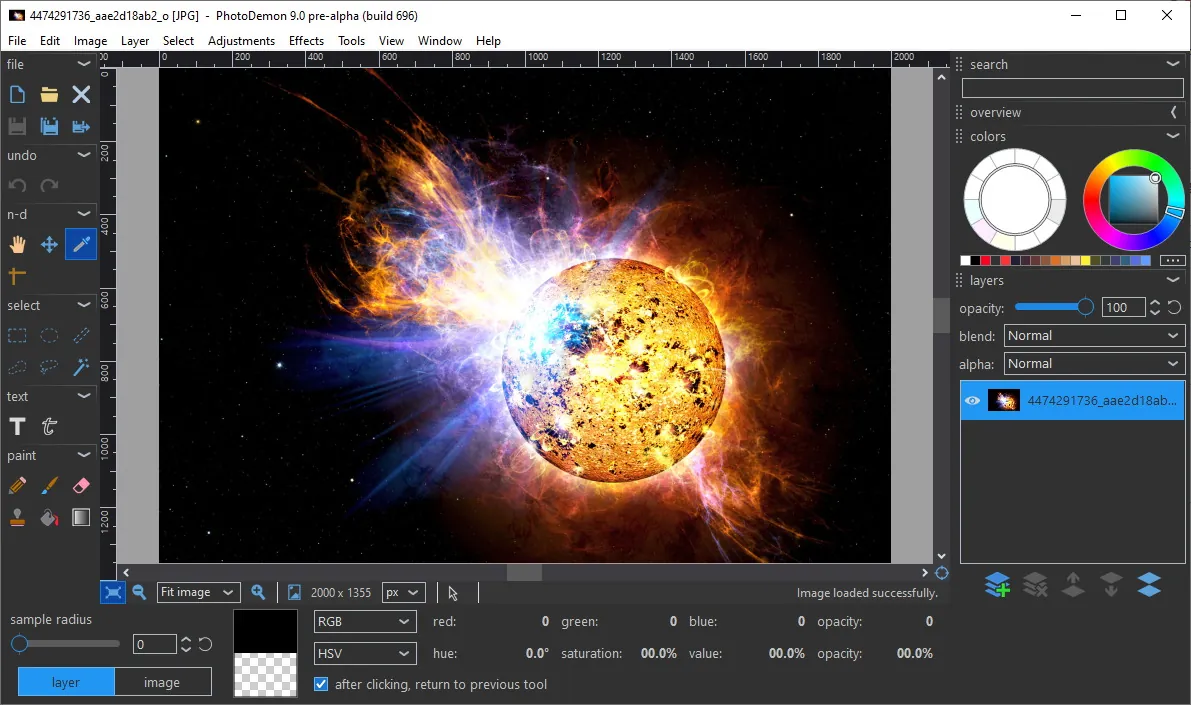
The editor has more than 200 tools, from levels, curves and white balance to content-aware fill, perspective correction and noise removal. It opens Photoshop PSD, PaintShop Pro PSP, GIMP XCF and major camera RAW formats, and a macro recorder with a batch processor applies the same edits to whole folders.
What it does well
- Fully portable. Unzip and run; no installer, no registry changes.
- Layers and text. Multi-layer editing with editable text layers and non-destructive changes.
- Wide format support. Opens PSD, PSP, XCF and major camera RAW formats.
- Macros and batch. Record edits as a macro and apply them to entire folders.
- Real-time previews. Effects preview live, with presets and unlimited undo.
Who it is for
Good fit
Windows users who want a capable photo editor that runs from a folder or USB stick without installation.
Look elsewhere
Mac and Linux users, and people working with very large files that a 32-bit app cannot load.
Pros and cons
Pros
- Free, open source, no installation
- Over 200 tools in a small download
- Opens PSD, XCF and RAW files
- Macro recorder and batch processor
Cons
- Windows only
- 32-bit only, so images over about 2 GB cannot be opened
- No installer, so no Start menu shortcut is created
How to install PhotoDemon
The official download is a zip archive, not an installer. Extract it to a folder of your choice and run PhotoDemon.exe. Avoid the nightly build linked on the same page unless you want to test unfinished changes.
Questions about PhotoDemon
Is PhotoDemon free?
Yes. It is open source under a BSD license and has no paid version.
Does PhotoDemon need to be installed?
No. It is portable: extract the zip and run it from any folder or USB drive.


