

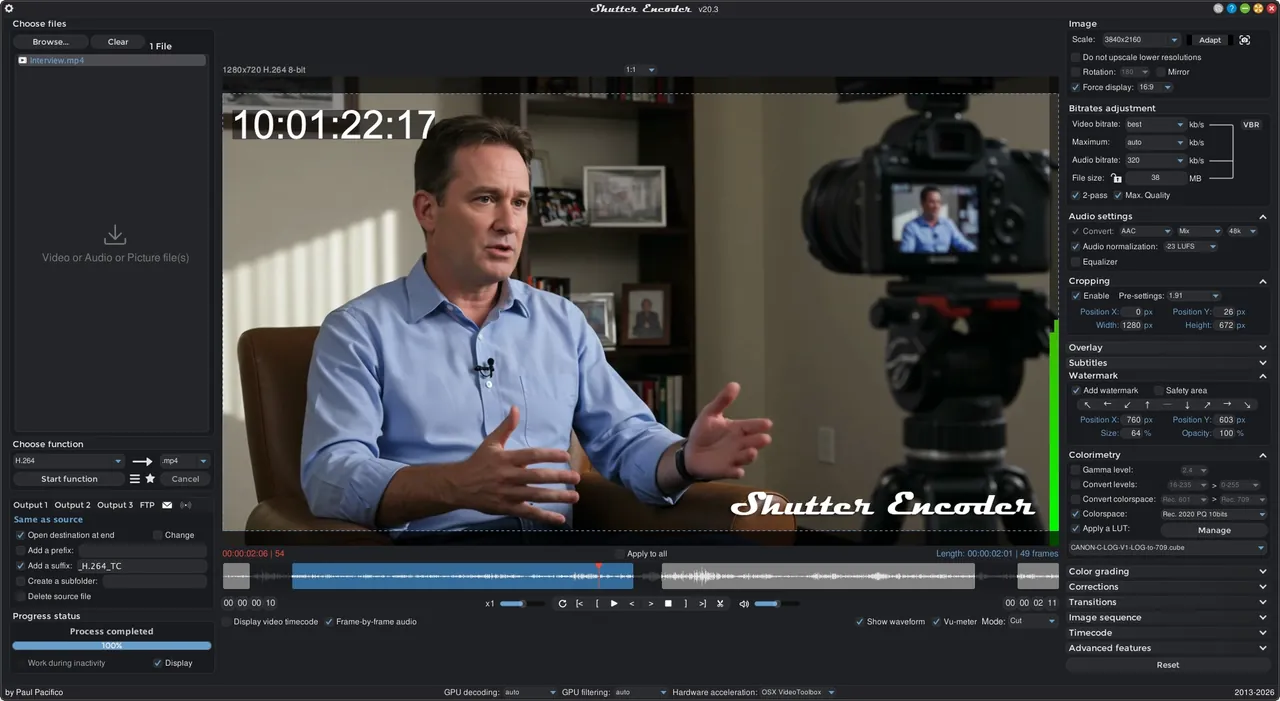
Our verdict: Shutter Encoder is a converter made by a video editor for video editors. It turns FFmpeg's power into a list of ready functions: ProRes and DNxHR for editing, H.264 and AV1 for delivery, lossless cuts and loudness analysis. The interface is packed, but each function is clearly named.
About Shutter Encoder
Shutter Encoder is developed by Paul Pacifico and released under the GNU GPL v3. It uses FFmpeg for encoding, and you pick a function such as H.265, Apple ProRes or Cut without re-encoding from a list instead of typing command lines.
Besides converting, it trims and crops video, adjusts colour and applies LUTs, burns in timecode and subtitles, detects cuts and black frames, measures loudness and true peak, and rips unprotected DVDs and Blu-rays. It also has AI tools for audio separation, transcription and background removal.
What it does well
- Editing and delivery codecs. ProRes, DNxHD, DNxHR, CineForm, H.264, H.265, VP9 and AV1 output.
- Cut without re-encoding. Trims supported files losslessly and quickly in the built-in player.
- Subtitles and burn-ins. Built-in subtitle editor, plus burned-in timecode, file names and logos.
- Analysis tools. Loudness and true peak, black frame and cut detection, VMAF comparison.
- Render queue. Queues different jobs and can upload results to FTP when finished.
Who it is for
Good fit
Video editors who need proxy and delivery files, and anyone who wants FFmpeg's options without the command line.
Look elsewhere
People who want a one-button converter with only a few presets.
Pros and cons
Pros
- Huge choice of professional codecs
- Lossless cutting and remuxing
- Loudness and quality analysis
- No watermark or limits
Cons
- Crowded interface with many options
- Large download because FFmpeg and AI tools are bundled
- Donation prompt before every download from the website
How to install Shutter Encoder
On the official site, the download section first shows a donation prompt; choose not to donate if you only want the file, and the Windows installer downloads. Choose a function from the list on the right, drop your files in, and press Start function. Settings can be saved as presets with Ctrl+S.
Questions about Shutter Encoder
Is Shutter Encoder free?
Yes. It is open source under the GNU GPL v3 with no paid version; the developer asks for optional donations.
Can Shutter Encoder create ProRes files on Windows?
Yes. Apple ProRes is one of its editing codec functions on Windows, macOS and Linux.
Does Shutter Encoder use FFmpeg?
Yes. FFmpeg does the encoding, and Shutter Encoder provides the interface and presets.


