

Our verdict: VidCoder gives you HandBrake's encoder with a Windows-native interface that is better at batch work. Its queue, simultaneous encodes and folder watcher save time when converting many files. It cannot remove disc copy protection, and it runs only on Windows.
About VidCoder
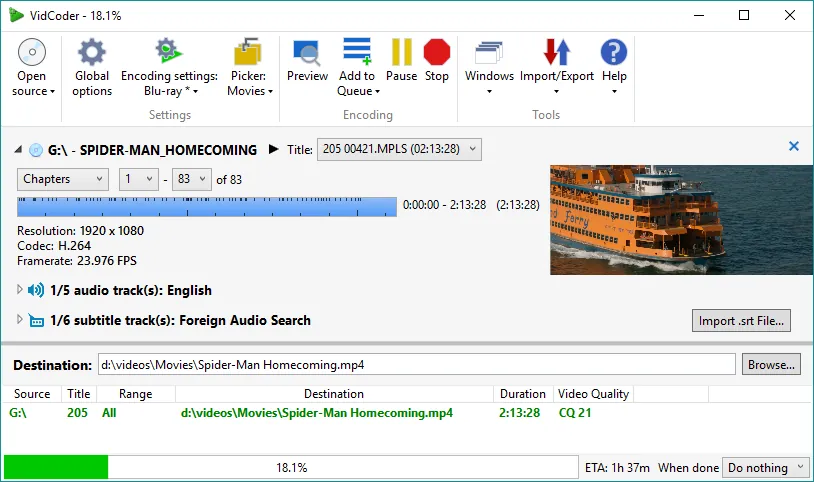
VidCoder is an open-source front end for the HandBrake encoding engine, written in C# and WPF by RandomEngy. You do not need to install HandBrake: the engine is built in, and the installer and portable versions have no prerequisites.
It converts files and unencrypted DVD and Blu-ray discs to MP4 or MKV with AV1, H.265, H.264, VP9 and other codecs. Compared with HandBrake's own interface, it focuses on batch work: several encodes at once, a folder watcher and pickers that choose audio and subtitle tracks automatically.
What it does well
- HandBrake engine. AV1, H.265, H.264, VP9 and MPEG-2 video with AAC, Opus, FLAC and passthrough audio.
- GPU encoding. Hardware encoding with NVIDIA NVENC, AMD VCE and Intel QuickSync.
- Batch encoding. Runs a queue with several simultaneous encodes, with pause and resume.
- Folder watcher. Automatically encodes new files that appear in a chosen folder.
- Pickers. Rules that automatically choose titles, audio and subtitle tracks and output names.
Who it is for
Good fit
People who convert many videos at once and want HandBrake quality with better batch tools.
Look elsewhere
Mac or Linux users, and anyone who needs to rip copy-protected commercial discs.
Pros and cons
Pros
- HandBrake quality in a Windows-native interface
- Simultaneous encodes and folder watching
- Hardware encoding support
- No prerequisites for the installer
Cons
- Cannot read encrypted commercial discs
- Windows only
- Many encoder options can overwhelm beginners
How to install VidCoder
Download the stable installer from vidcoder.net; a portable version is also offered. Skip the Beta download unless you want to test new features. Commercial DVDs and Blu-rays are encrypted, so you need a separate tool to remove the protection before VidCoder can read them.
Questions about VidCoder
Is VidCoder free?
Yes. It is open source under the GNU GPL v2.
Do I need HandBrake to use VidCoder?
No. VidCoder includes the HandBrake encoding engine.
VidCoder or HandBrake?
Both produce the same quality. VidCoder adds simultaneous encodes, a folder watcher and track pickers, but runs only on Windows; HandBrake also runs on macOS and Linux.


