

Our verdict: StaxRip is one of the most capable free encoding tools on Windows, bundling many encoders and filter frameworks in one portable package. It is not a one-click converter: you need to understand codecs and filters to get good results.
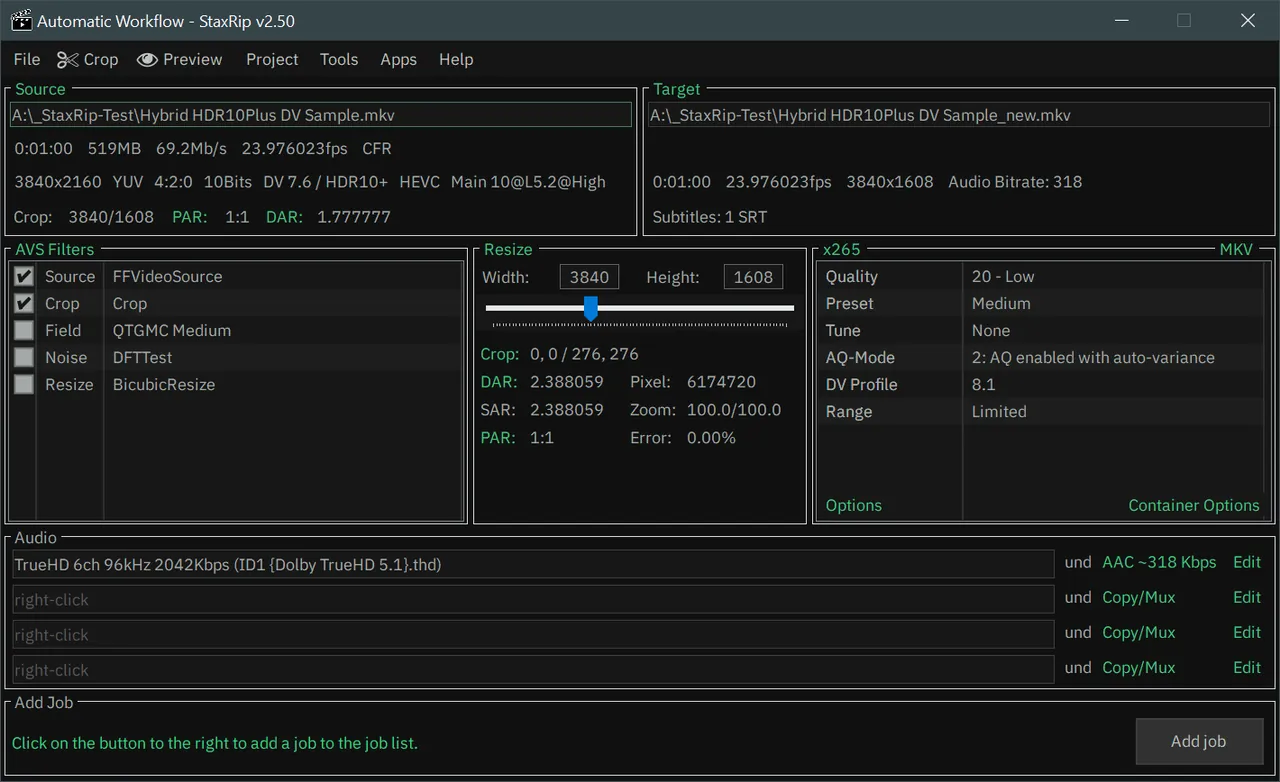
About StaxRip
StaxRip is an open-source encoding GUI that runs and controls console tools such as x265, mkvmerge and FFmpeg. Video filtering is done through script-based frame servers, AviSynth+ and VapourSynth, so you can use the same filters as dedicated encoding enthusiasts.
It is portable: you extract the archive and run StaxRip.exe, and it asks where to store settings on first start. Many bundled tools need Microsoft Visual C++ runtimes. An Assistant guides new users through each step of a job.
What it does well
- Many encoders. Controls x265, FFmpeg, mkvmerge and other console tools from one interface.
- AviSynth+ and VapourSynth. Script-based filtering for deinterlacing, denoising, resizing and more.
- Assistant. Points out the next step and common mistakes while you set up a job.
- Job queue. Queue several encodes and run them one after another.
- Events and macros. Run commands or change settings automatically at points in a job.
Who it is for
Good fit
Experienced encoders who want fine control over x265 or AV1 encodes and filter chains.
Look elsewhere
Beginners who want to convert a file to MP4 with one click.
Pros and cons
Pros
- Huge set of encoders and filters in one package
- Portable, no installation
- AviSynth+ and VapourSynth support
- Assistant helps new users avoid mistakes
Cons
- Steep learning curve
- Needs 7-Zip to extract and Visual C++ runtimes for some tools
- Windows only
How to install StaxRip
Download the x64 .7z archive from the latest GitHub release and extract it with 7-Zip into a folder you can write to. On first start choose to store settings in a subfolder of the StaxRip folder. If StaxRip or a tool fails to start, install the Microsoft Visual C++ Redistributable runtimes. Do not run old jobs in a new StaxRip version.
Questions about StaxRip
Is StaxRip free?
Yes. It is open source under the MIT license.
Does StaxRip have an installer?
No. StaxRip is portable: extract the .7z archive and run StaxRip.exe.
Is StaxRip good for beginners?
Not really. The developers say it is not a one-click encoder, though its Assistant helps you avoid mistakes.


