

Our verdict: Zim is a lightweight personal wiki that keeps every page as a readable text file in a folder, which makes notes easy to back up, search and keep for decades. Plugins add a journal, a task list and more. It looks plain, has no mobile app and is mainly developed for Linux, with a separate Windows installer.
About Zim
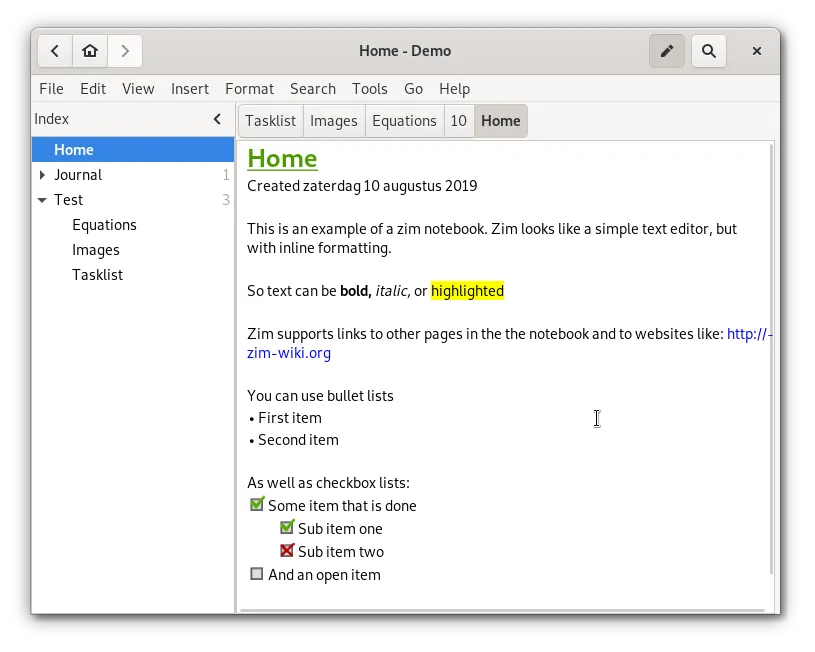
Zim is a graphical text editor for maintaining a collection of wiki pages, developed by Jaap Karssenberg and contributors under the GPL v2 or later. Each page is a plain-text file with wiki markup, and links between pages are created by typing a page name or using CamelCase words.
Pages are organised in a hierarchy that maps to folders on disk. Plugins add a calendar-based journal, a task list collected from all pages, an equation editor, diagrams and version control. The 64-bit Windows installer is built on MSYS2 and tested on Windows 11; 32-bit systems are not supported.
What it does well
- Plain-text pages. Every page is a text file with wiki markup, readable without Zim.
- Easy linking. Link pages by name and create new pages by following a link.
- Journal plugin. A calendar opens one page per day, week or month for a diary or log.
- Task list. Collects checkboxes and TODO items from all pages into one list.
- Export. Exports pages or the whole notebook to HTML, LaTeX, Markdown or reStructuredText.
Who it is for
Good fit
People who want a simple offline wiki for notes, a work log or a personal knowledge base in plain files.
Look elsewhere
Users who want a modern-looking app with sync, mobile apps and rich media.
Pros and cons
Pros
- Open source and lightweight
- Notes stay as plain text files
- Useful journal and task plugins
Cons
- Plain, dated interface
- Uses its own wiki syntax rather than Markdown
- No sync or mobile app
How to install Zim
The direct link downloads the official 64-bit Windows installer. On first start Zim asks for a notebook folder; choose one inside a synced folder such as Nextcloud or Dropbox if you want a copy on other PCs. Enable the Journal and Task List plugins under Edit, Preferences, Plugins.
Questions about Zim
Is Zim free?
Yes. Zim is open source under the GPL v2 or later and has no paid version.
Where does Zim save notes?
Each page is a .txt file in a folder of your choice, so you can back it up or sync it with any tool.
Does Zim use Markdown?
Zim uses its own wiki markup for pages, but it can export notes to Markdown.


