

Our verdict: Advanced SystemCare Free bundles a junk cleaner, startup manager and privacy sweep behind one Scan button. The cleanup is real, but the speed claims and registry cleaning are oversold, and the app is built to push the PRO subscription and other IObit tools.
About IObit Advanced SystemCare Free
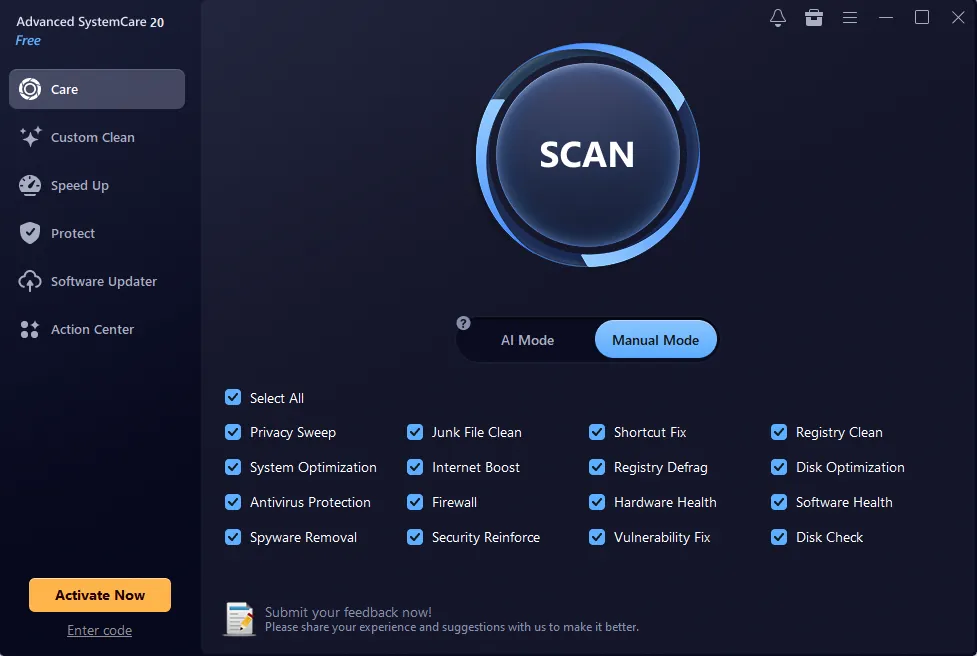
Advanced SystemCare is IObit's all-in-one maintenance suite. One scan, in AI Mode or Manual Mode, runs modules such as junk file cleaning, privacy sweep, shortcut fix, registry clean and defrag, startup optimization and disk checks. Separate tabs offer Custom Clean for large and duplicate files, Turbo Boost to pause background services, protection settings and a software updater.
According to IObit's comparison, the free edition covers startup optimization, junk cleaning, RAM release and email protection, while deeper cleaning, automatic care, privacy and identity protection and premium support need the paid PRO subscription. Microsoft does not support the use of registry cleaners, so treat the registry module and the speed-up figures with caution.
What it does well
- One-click scan. Runs cleaning, privacy and repair modules together in AI or Manual mode.
- Custom Clean. Finds large and duplicate files on drive C.
- Startup optimizer. Disables or delays programs that start with Windows.
- Privacy sweep. Clears browser history, cookies and recent-file traces.
- Turbo Boost. Temporarily stops non-essential services for work or games.
Who it is for
Good fit
Users who want one tool for routine junk cleanup and startup management and accept upsell prompts.
Look elsewhere
Anyone wary of registry cleaners or tools that run in the background; Windows Storage Sense covers basic cleanup.
Pros and cons
Pros
- Many cleanup tools in one app
- Finds large and duplicate files
- Startup manager is easy to use
- Free edition has no time limit
Cons
- Heavy promotion of PRO and other IObit products
- Registry cleaning and speed-up claims are overstated
- Adds background monitoring that most PCs do not need
How to install IObit Advanced SystemCare Free
Read every installer screen and untick offers for other IObit or partner software. After installing, turn off background monitors you do not need and untick Registry Clean in Manual Mode. Create a restore point before the first deep clean.
Questions about IObit Advanced SystemCare Free
Is Advanced SystemCare free?
Yes, the Free edition is free with no time limit. Deeper cleaning, automatic care and the privacy and identity protection features require the paid PRO subscription.
Will Advanced SystemCare make my PC faster?
Freeing disk space and disabling startup programs can help a cluttered PC start faster. Registry cleaning gives no meaningful speed gain, and Microsoft does not support registry cleaners.


