Aegisub — Free Subtitle Editor

By Aegisub Project (TypesettingTools) · Video
  • Open source
  • Free
  • Video
Download Aegisub Direct download from github.com Official download page Link checked October 19, 2026

Our verdict: Aegisub is the standard tool for styled ASS subtitles, as used in anime fansubs and karaoke videos. It times lines on an audio waveform and places, rotates and animates text right on the video. It is built around the ASS format and has no automatic speech recognition or translation.
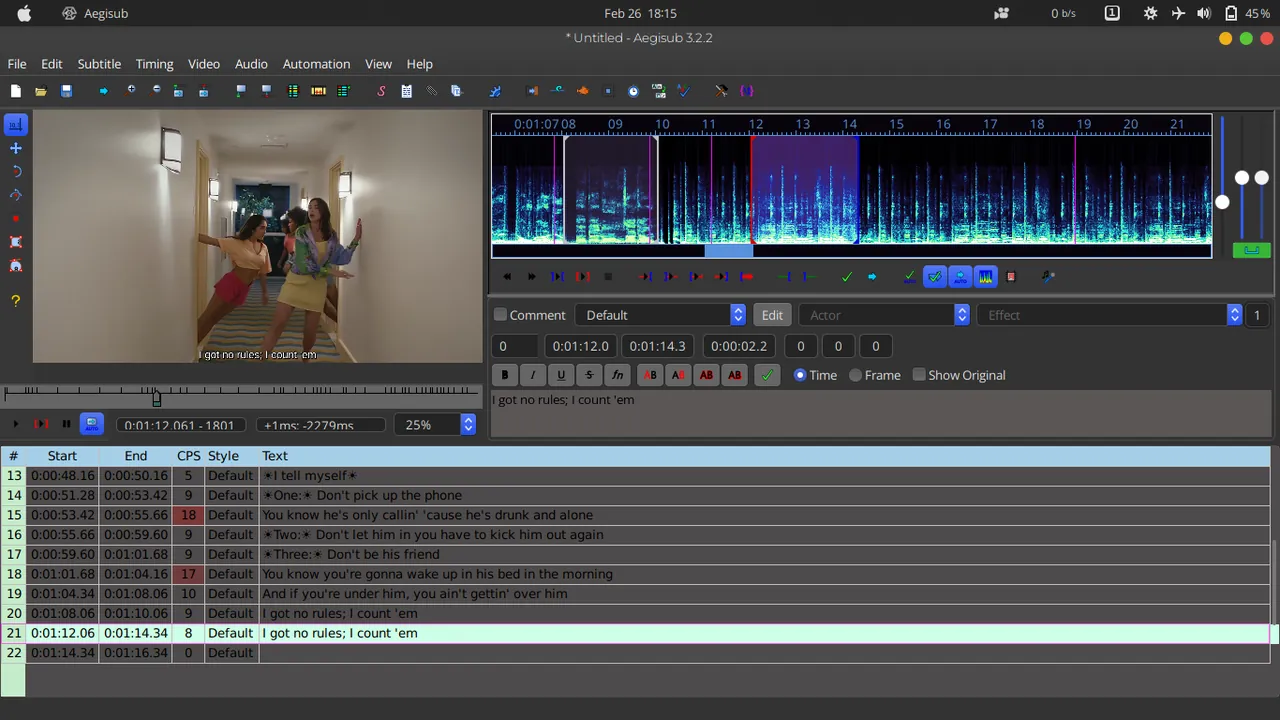
Aegisub 3.2 with video preview, audio spectrum display and the subtitle grid
Aegisub 3.2 with video preview, audio spectrum display and the subtitle grid · Screenshot: NairobiPapel, CC BY-SA 4.0, via Wikimedia Commons

About Aegisub

Aegisub is an open-source subtitle editor released under a BSD license. After the original project went quiet, the TypesettingTools community took over development and publishes current releases on GitHub.

You time lines by listening to the audio and marking start and end points on the waveform or spectrum display. Styles control fonts, colours and borders, while visual typesetting tools let you drag, rotate and clip text on the video frame. Lua automation scripts add karaoke effects and batch tasks.

What it does well

  • Audio timing. Mark line timing on a waveform or spectrum with keyboard shortcuts.
  • Styles. Reusable styles for fonts, colours, outlines and positions.
  • Visual typesetting. Move, rotate, scale and clip text directly on the video.
  • Karaoke timing. Times individual syllables for karaoke effects.
  • Lua automation. Scripts automate repetitive edits and create complex effects.

Who it is for

Good fit

Fansubbers and video creators who need precisely timed, styled or animated subtitles.

Look elsewhere

People who only need to fix a simple SRT file or want subtitles generated automatically.

Pros and cons

Pros

  • Best-in-class ASS styling and typesetting
  • Accurate waveform timing
  • Powerful Lua automation
  • No ads

Cons

  • Steep learning curve
  • Built around ASS; other formats are only converted
  • No speech-to-text or automatic translation

How to install Aegisub

Download the x64 installer from the official downloads page and run it. Open your video and then its audio (Audio → Open Audio from Video) so the waveform appears. Learn the timing shortcuts early; they make work much faster.

Questions about Aegisub

Is Aegisub free?

Yes. Aegisub is open source under a BSD license and has no paid version.

Is Aegisub still maintained?

Yes. The TypesettingTools community maintains Aegisub and publishes new releases on GitHub.

Can Aegisub open SRT files?

Yes. It imports and exports SRT, but its styling and typesetting tools work with ASS subtitles.

Download Aegisub from aegisub.org ExeDepot does not host this file. The download starts from the developer's server, github.com. Other versions are on the official download page.

Alternatives to Aegisub

  • Subtitle Edit Subtitle Editor

    Subtitle editor with waveform syncing, OCR, speech-to-text and hundreds of formats.

    Nikolaj Olsson · Open source · github.com/SubtitleEdit
  • Subtitle Workshop Subtitle Editor

    Classic subtitle editor for 60+ text formats with timing tools, error checking and a video preview.

    Andrey Spiridonov and Subtitle Workshop contributors · Open source · subworkshop.sourceforge.net
  • VirtualDub2 Video Processing Tool

    Frame-accurate video processor with filters, H.264 and FFV1 encoding, based on classic VirtualDub.

    Anton Shekhovtsov (shekh), based on VirtualDub by Avery Lee · Open source · sourceforge.net/projects/vdfiltermod
  • Kinovea Video Analysis Tool

    Open-source sport and motion analysis tool: slow motion, drawings, angles and side-by-side videos.

    Kinovea contributors · Open source · kinovea.org

Similar to Aegisub All video apps

  • MKVToolNix MKV Toolkit

    Create, edit and inspect MKV files: merge tracks, extract subtitles and edit headers without re-encoding.

    Moritz Bunkus · Open source · mkvtoolnix.download
  • FFmpeg Command-Line Media Toolkit

    Command-line toolkit that converts, records, cuts and streams almost any audio or video format.

    FFmpeg project · Open source · ffmpeg.org
  • LosslessCut Lossless Video Cutter

    Cut, trim and merge video and audio files in seconds without re-encoding, powered by FFmpeg.

    Mikael Finstad (mifi) · Open source · github.com/mifi
  • MediaInfo Media File Analyzer

    Shows codec, bitrate, resolution, audio tracks and other technical data of media files.

    MediaArea.net SARL · Open source · mediaarea.net