Audacious — Free Music Player

By Audacious developers · Audio
  • Open source
  • Free
  • Audio
Download Audacious Direct download from distfiles.audacious-media-player.org Official download page Link checked October 19, 2026

Our verdict: Audacious is a small, fast music player that does not get in the way. It can look like a modern player or like classic Winamp, skins included. Library management is basic, so it suits people who play folders and playlists rather than browse a big catalog.
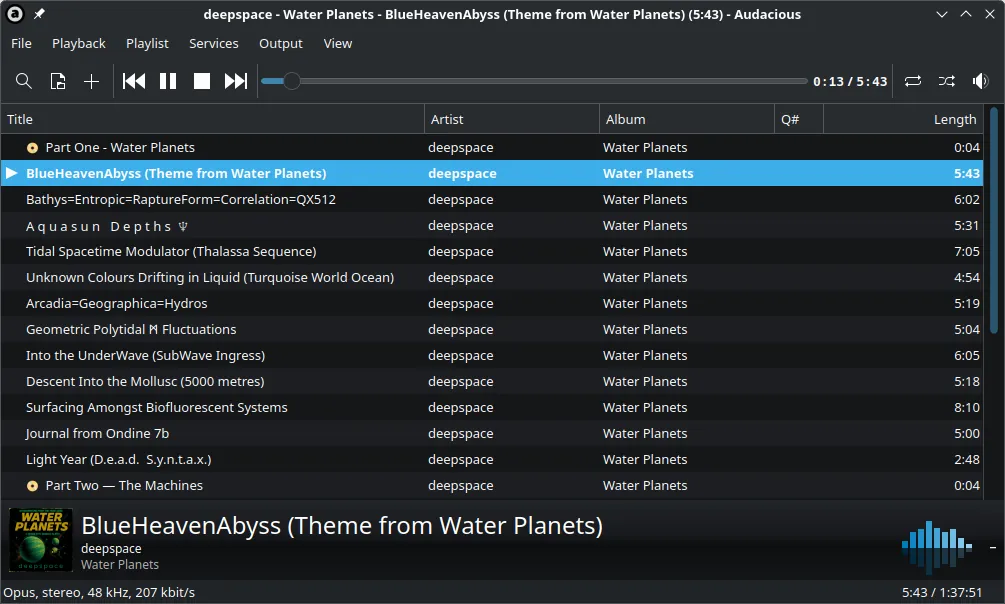
Audacious 4.5 with the Qt interface showing a playlist and the now-playing track
Audacious 4.5 with the Qt interface showing a playlist and the now-playing track · Screenshot: VulcanSphere, BSD, via Wikimedia Commons

About Audacious

Audacious is an open-source player developed by volunteers, mainly for Linux, with an official Windows build. It is released under a BSD-style license.

It uses Qt by default and offers two interfaces: a standard window with playlist tabs and a Winamp Classic interface that loads Winamp 2 skins. Plugins add formats, effects, visualizations and output options.

What it does well

  • Two interfaces. Choose a modern Qt window or a Winamp Classic interface with skin support.
  • Low resource use. Starts quickly and uses little memory, even with long playlists.
  • Plugins. Effects, visualizations, lyrics, scrobbling and extra format support.
  • Playlist tabs. Keep several playlists open at once and switch between them.
  • Equalizer and effects. Built-in equalizer, crossfade, ReplayGain and other effect plugins.

Who it is for

Good fit

People who want a light player for folders and playlists, especially fans of the classic Winamp look.

Look elsewhere

Collectors who need a rich music library, tag editing or 32-bit Windows support.

Pros and cons

Pros

  • Fast and light
  • Winamp Classic skins supported
  • Open source with no ads

Cons

  • Basic music library
  • Windows build is secondary to Linux
  • No 32-bit or Windows 7 support in current versions

How to install Audacious

Download the .exe installer from audacious-media-player.org; the .zip is a portable alternative. The file name says win32, but current versions need 64-bit Windows 10 or later. Switch to the Winamp-style look under Settings → Appearance → Interface.

Questions about Audacious

Is Audacious free?

Yes. It is open source under a BSD license and free for any use.

Can Audacious use Winamp skins?

Yes. The Winamp Classic interface loads classic Winamp 2 skins.

Download Audacious from audacious-media-player.org ExeDepot does not host this file. The download starts from the developer's server, distfiles.audacious-media-player.org. Other versions are on the official download page.

Alternatives to Audacious

  • Winamp Music Player

    Classic skinnable music player for local files, playlists and internet radio.

    Llama Group · Freeware · winamp.com
  • foobar2000 Audio Player

    Lightweight, highly customizable audio player with gapless playback, ReplayGain and a converter.

    Peter Pawłowski · Freeware · foobar2000.org
  • AIMP Music Player

    Feature-rich music player with a 20-band equalizer, converter, tag editor and skins.

    Artem Izmaylov · Freeware · aimp.ru
  • iTunes Media Player

    Apple's media player and store app for Windows, now mainly for podcasts, audiobooks and old libraries.

    Apple · Freeware · apple.com

Similar to Audacious All audio apps

  • Plexamp Music Player

    Music player for your Plex Media Server library; free, with extra features for Plex Pass members.

    Plex, Inc. · Freeware · plex.tv
  • MusicBee Music Manager

    Music player and library manager with auto-tagging, device sync, podcasts and skins.

    Steven Mayall · Freeware · getmusicbee.com
  • Harmonoid Music Player

    Material Design music player for local files with mpv/FFmpeg playback, lyrics and gapless audio.

    Hitesh Kumar Saini · Freeware · harmonoid.com
  • Feishin Self-Hosted Music Player

    Desktop music player for your own Navidrome, Jellyfin or Subsonic server, with lyrics and an MPV backend.

    jeffvli and Feishin contributors · Open source · github.com/jeffvli