

Our verdict: Avidemux is a small tool for quick jobs: cut out ads, trim a clip, resize or re-encode a video. In copy mode it saves the result without re-encoding, so it is fast and lossless. It is not a timeline editor, and the last stable release dates from 2022.
About Avidemux
Avidemux is an open-source editor released under the GNU GPL v2. It works on one video at a time: you set start and end markers, delete or keep sections, and save the result in MP4, MKV, AVI or other containers.
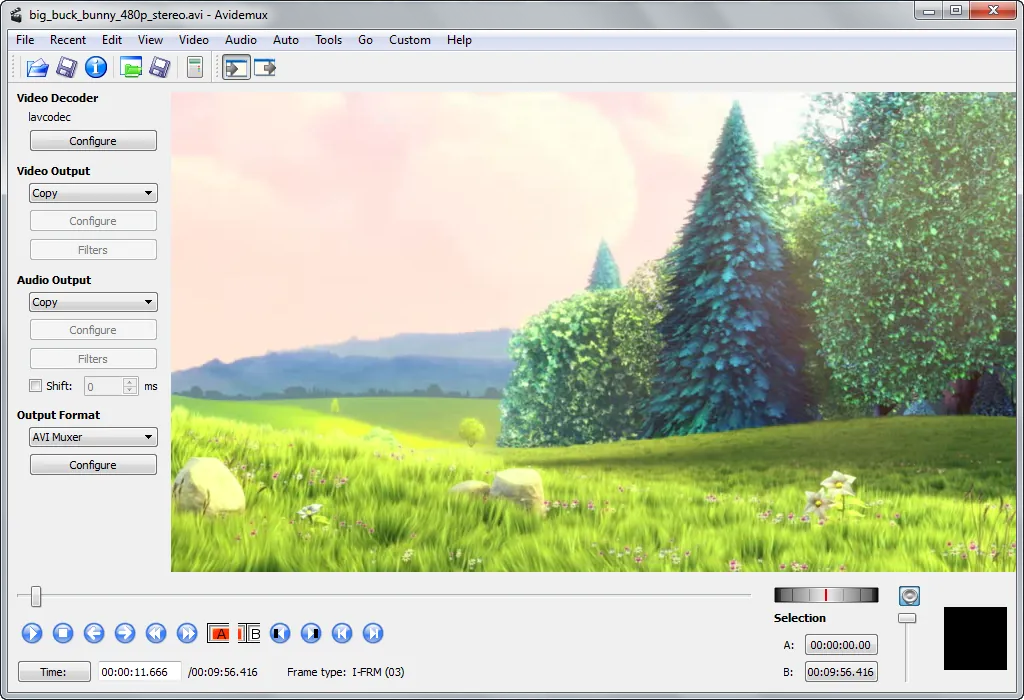
With video and audio set to Copy, Avidemux saves the edited file without re-encoding, which is fast and keeps the original quality. When you choose an encoder such as x264 or x265, you can apply filters for resizing, cropping, deinterlacing, sharpening or burning in subtitles.
What it does well
- Lossless copy mode. Cuts and joins video without re-encoding when the output uses Copy.
- Re-encoding. Converts to H.264, H.265 and other formats with x264 and x265 settings.
- Video filters. Resize, crop, deinterlace, denoise, sharpen and burn in subtitles.
- Job queue. Saves encoding jobs and runs them one after another.
- Scripting. Projects can be saved and automated with scripts for repeated tasks.
Who it is for
Good fit
People who need to trim recordings, remove ads from TV captures or re-encode a file with a few filters.
Look elsewhere
Anyone who wants a multitrack timeline with titles, transitions and effects.
Pros and cons
Pros
- Lossless cutting in copy mode
- Small and quick to learn
- Useful filters for re-encoding
- No ads or bundled software
Cons
- Last stable release is from 2022; newer versions are nightly builds only
- Lossless cuts must start on a keyframe
- Single-track editing with a dated interface
How to install Avidemux
Download the 64-bit VC++ installer and run it; there are no bundled offers. If Avidemux crashes after loading a video, the developers suggest disabling OpenGL in Preferences. For lossless cuts, place markers on keyframes, or the start of the clip may show artifacts.
Questions about Avidemux
Is Avidemux free?
Yes. Avidemux is open source under the GNU GPL v2 and has no paid version.
Can Avidemux cut video without losing quality?
Yes. Set both video and audio output to Copy and the edited file is saved without re-encoding, as long as the cut starts on a keyframe.
Is Avidemux still developed?
Development continues in nightly builds on avidemux.org, but the latest stable release is version 2.8.1 from 2022.


