

Our verdict: DaVinci Resolve's free version is the most capable free video editor on Windows, with editing, color grading, effects and audio post in one program. It needs a strong PC with a good graphics card. Some AI tools, noise reduction and projects above Ultra HD or 60 fps require the paid Studio version.
About DaVinci Resolve
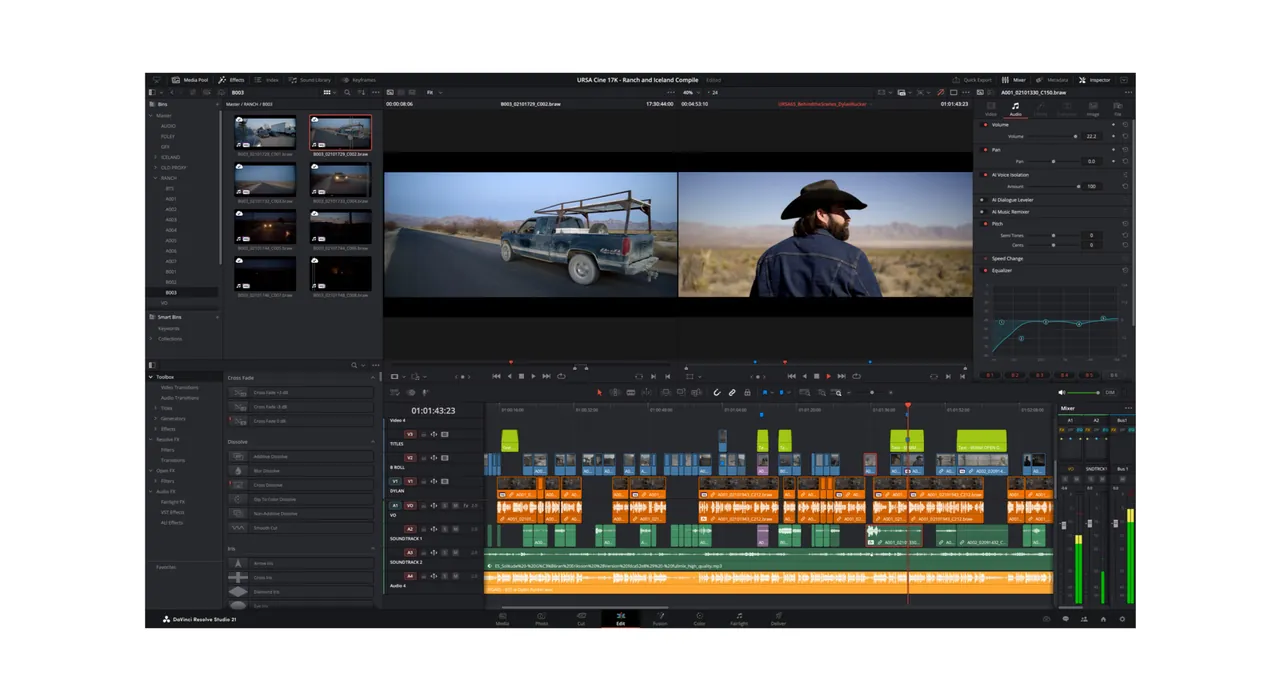
DaVinci Resolve is made by Blackmagic Design and is used for film and TV post-production. The work is split into pages: Media, Cut, Edit, Fusion for visual effects, Color, Fairlight for audio and Deliver for export. Version 21 adds a Photo page for still images.
The free version has no watermark or time limit. Blackmagic says it works with virtually all 8-bit formats up to Ultra HD 3840 x 2160 at up to 60 fps and includes HDR grading and multi-user collaboration. DaVinci Resolve Studio adds the Neural Engine AI tools, more Resolve FX, temporal and spatial noise reduction, 10-bit viewers on Windows, multiple GPUs, frame rates up to 120 fps and resolutions beyond 4K.
What it does well
- Two editing pages. The Cut page is built for fast turnaround; the Edit page is a traditional multi-track timeline.
- Color page. Node-based grading with color wheels, curves, qualifiers, Power Windows, tracking and HDR tools.
- Fusion. Node-based visual effects, compositing and animated titles inside the same project.
- Fairlight audio. Multi-track mixing, EQ, dynamics and Fairlight FX for dialogue and sound design.
- Deliver page. Render queue with full control over formats, plus quick uploads to YouTube and Vimeo.
Who it is for
Good fit
Creators who want professional editing and color grading and have a PC with a capable GPU.
Look elsewhere
Older or low-memory PCs, and people who only need quick trims or simple slideshows.
Pros and cons
Pros
- No watermark or time limit
- Industry-standard color grading
- Editing, effects and audio in one app
- Runs on Windows, macOS and Linux
Cons
- Demanding on RAM and graphics card
- Many AI tools and noise reduction need the paid Studio version
- Registration form before download
How to install DaVinci Resolve
On the official page click Download and pick DaVinci Resolve for Windows, not Studio. Blackmagic shows a registration form before the download starts. Blackmagic's minimum for Windows is 16 GB of RAM (32 GB with Fusion) and a graphics card with at least 4 GB of VRAM that supports OpenCL 1.2 or CUDA; update your GPU driver first, using the NVIDIA Studio driver on NVIDIA cards.
Questions about DaVinci Resolve
Is DaVinci Resolve really free?
Yes. The free version has no watermark or time limit. DaVinci Resolve Studio is a separate paid version with extra tools.
What does the free DaVinci Resolve not include?
Timelines above Ultra HD or 60 fps, noise reduction, Magic Mask, AI transcription, Voice Isolation, multiple GPUs and many Resolve FX are Studio-only.
Will DaVinci Resolve run on my laptop?
Check the hardware first. On Windows, Blackmagic's minimum is 16 GB of RAM and a GPU with at least 4 GB of VRAM; advanced AI tools need 16 GB of VRAM.


