

Our verdict: Bulk Rename Utility can handle almost any renaming job, from adding numbers to rebuilding names from EXIF dates or MP3 tags. The preview shows every new name before anything changes. The crowded interface is intimidating, and business use requires a paid license.
About Bulk Rename Utility
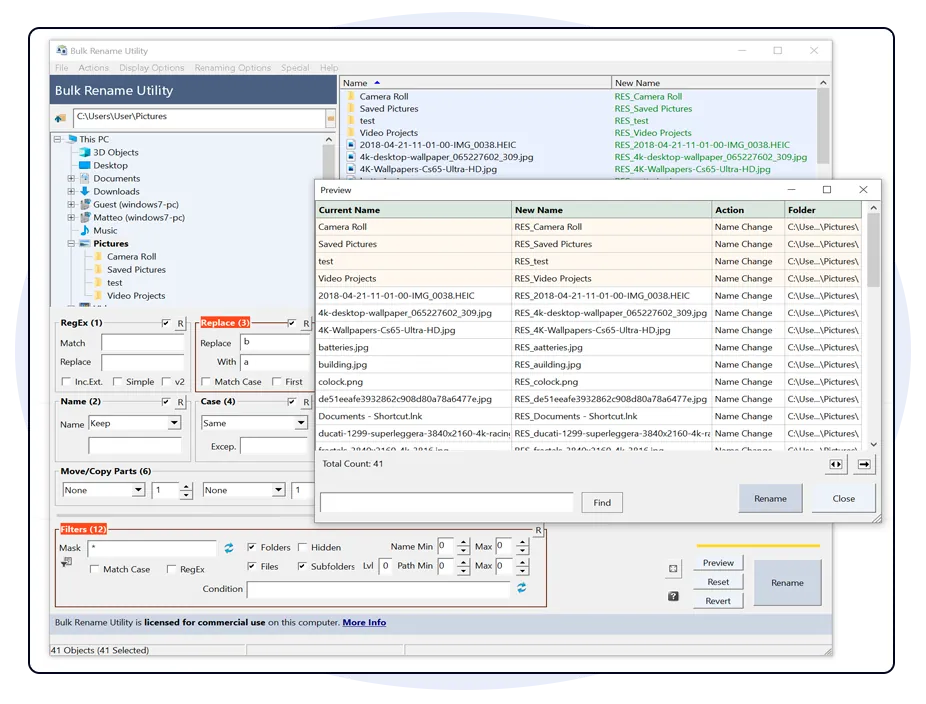
Bulk Rename Utility by TGRMN Software renames many files and folders in one go. Its main window shows all options at once in numbered panels: replace text, change case, remove or add characters, number files, move parts of the name, use regular expressions and change extensions. A New Name column previews the result for every file.
It can also build names from photo EXIF data and MP3 tags and change file timestamps. The developer states that the installer is signed, contains no ads or bundled software and sends no data home. It is free for personal, private use at home; business use needs a commercial license, and JavaScript renaming is unlocked only with a paid license.
What it does well
- Many rename rules. Replace, remove, add, case, numbering and move, combined in one pass.
- Live preview. Shows the new name of each file before you rename.
- Regular expressions. Match and rebuild names with regex.
- Metadata. Use EXIF photo data and MP3 tags in new names.
- Portable and command line. No-install ZIP and a free command-line version are available.
Who it is for
Good fit
Home users renaming large batches of photos, music or documents with complex rules.
Look elsewhere
Business users who will not buy a license, and people who want a simple, uncluttered interface.
Pros and cons
Pros
- Extremely flexible rename rules
- Live preview of every new name
- No ads or bundled software
- Portable and command-line versions
Cons
- Free only for personal use at home
- Very busy interface with dozens of fields
- JavaScript renaming requires a paid license
How to install Bulk Rename Utility
Run the installer; it contains both 32-bit and 64-bit versions and installs nothing else. Select files in the top pane, set options in the panels and check the New Name column before pressing Rename. Turn on the undo batch file option if you want a way back.
Questions about Bulk Rename Utility
Is Bulk Rename Utility free?
Yes, for personal, private use at home. Using it in a business or for commercial purposes requires a commercial license per computer.
Is there a portable version?
Yes. The download page offers BRU_NoInstall.zip, which runs without installation.
Can Bulk Rename Utility rename photos by date?
Yes. It can read EXIF data from photos and use it in the new file names.


