

Our verdict: DevToys replaces a pile of random websites with one offline app for everyday developer chores such as formatting JSON, decoding a JWT or generating a UUID. Smart Detection picks the right tool from your clipboard. It is free and open source; the main limitation is that the GitHub builds of version 2 are still labeled pre-release.
About DevToys
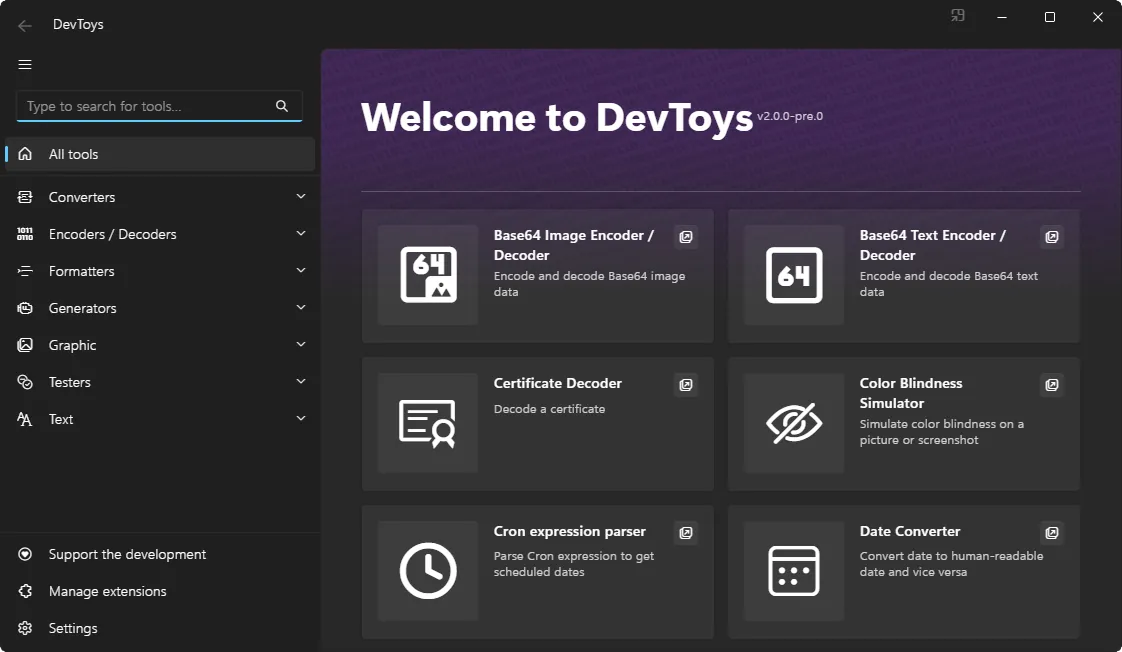
DevToys is a free, open-source app that comes with about 30 offline tools. Converters handle JSON and YAML, JSON arrays to CSV, number bases, dates and cron expressions. Encoders and decoders cover Base64 text and images, JWT, URL, HTML, GZip, QR codes and certificates. There are formatters for JSON, SQL and XML, generators for hashes, UUIDs, passwords and Lorem Ipsum, and testers for regular expressions, JSONPath and XML schemas.
Because everything runs locally, you do not paste tokens or customer data into unknown websites. Smart Detection looks at the clipboard and suggests or opens the matching tool. Version 2 runs on Windows, macOS and Linux, adds an extension manager with community tools from NuGet, and has a separate DevToys CLI for scripts and CI pipelines.
What it does well
- Converters. JSON to YAML and back, JSON array to table or CSV, number bases, dates and cron.
- Encoders and decoders. Base64, JWT, URL, HTML, GZip, QR codes and certificates.
- Formatters and testers. Format JSON, SQL and XML; test regular expressions, JSONPath and XSD.
- Generators. Hashes and checksums, UUIDs, passwords and Lorem Ipsum text.
- Smart Detection. Recognizes clipboard content and opens the matching tool.
Who it is for
Good fit
Developers who often convert, decode or format data and want to keep it on their own PC.
Look elsewhere
People who need a full API client or a code editor; DevToys handles small, single-purpose tasks.
Pros and cons
Pros
- Free and open source (MIT)
- Works offline, so data stays on your PC
- About 30 tools in one window
- Extensions and a command-line version
Cons
- Version 2 builds on GitHub are still marked as pre-release
- Simple tools only; no API testing or scripting
- Some useful tools are separate community extensions
How to install DevToys
The official download page offers the Microsoft Store version, a classic installer for x64, x86 and ARM64, portable ZIP builds and winget (winget install DevToys-app.DevToys). Pick the x64 classic installer if you do not use the Store. Add community tools from the built-in extension manager.
Questions about DevToys
Is DevToys free?
Yes. DevToys is free and open source under the MIT license, with no paid version.
Does DevToys send my data online?
No. The built-in tools work offline, so JSON, tokens and text you paste are processed on your PC.
Is there a command-line version of DevToys?
Yes. DevToys CLI is a separate app with most tools that make sense on the command line, useful for scripts and continuous integration.


