

Our verdict: Flameshot makes quick annotated screenshots very fast: select, mark up in place, save or copy. It is free, open source and has no ads. It focuses on still images, so there is no screen recording or scrolling capture.
About Flameshot
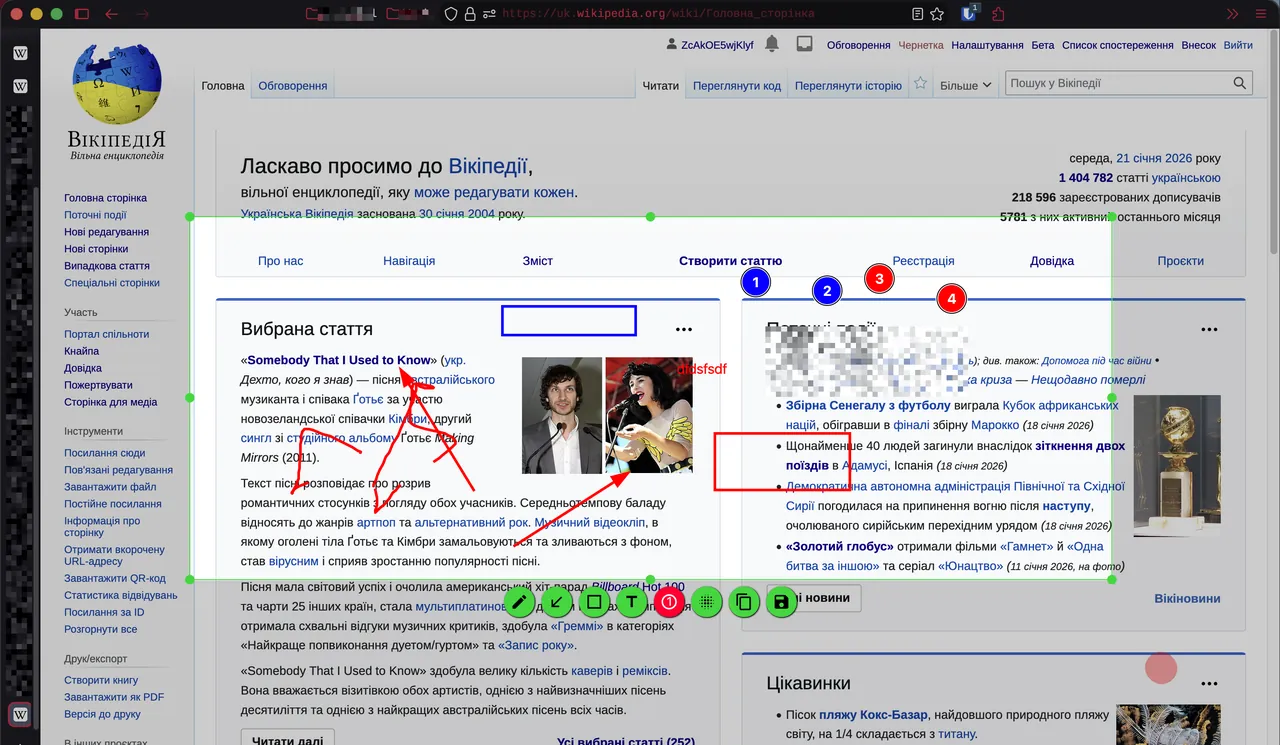
Flameshot lets you drag a selection box over the screen and then edit the capture right there, before saving. Built-in tools add arrows, highlighted text, blur or pixelation, free drawing, rectangles and circles, solid boxes and incrementing number markers.
The configuration dialog customises the interface colour, which buttons appear, keyboard shortcuts and how images are saved. A command-line interface lets you take screenshots from scripts or bind them to keys. The Windows version is 64-bit and comes as an installer or a portable ZIP.
What it does well
- In-place annotation. Arrows, text, shapes, blur and markers right on the capture.
- Incrementing counters. Numbered markers for step-by-step guides.
- Blur and pixelate. Hide sensitive details before sharing.
- Customisable. Change colours, buttons, shortcuts and save options.
- Command line. Script captures or bind them to custom keys.
Who it is for
Good fit
Anyone who writes guides, bug reports or chats and needs quick marked-up screenshots.
Look elsewhere
Users who need screen recording, scrolling capture or upload workflows; ShareX covers those.
Pros and cons
Pros
- Fast capture and annotate workflow
- Free and open source, no ads
- Blur, arrows and numbered markers
- Installer or portable ZIP
Cons
- No screen recording or scrolling capture
- Windows version is 64-bit only
How to install Flameshot
Run the 64-bit MSI; a portable ZIP is also on the release page. Flameshot runs in the tray. Open its configuration to set the capture shortcut, for example Print Screen, and the default save folder.
Questions about Flameshot
Is Flameshot free?
Yes. Flameshot is free and open source under the GPL v3 license.
Can Flameshot blur parts of a screenshot?
Yes. The built-in tools can blur or pixelate an area before you save the image.
Is there a portable Flameshot for Windows?
Yes. Besides the MSI installer, a portable 64-bit ZIP is published with each release.


