

Our verdict: PicPick bundles a screenshot tool, screen recorder, Ribbon-style image editor and a set of design helpers in one app. The free version has every tool. Commercial use requires a paid license, and the many features make it heavier than single-purpose capture tools.
About PicPick
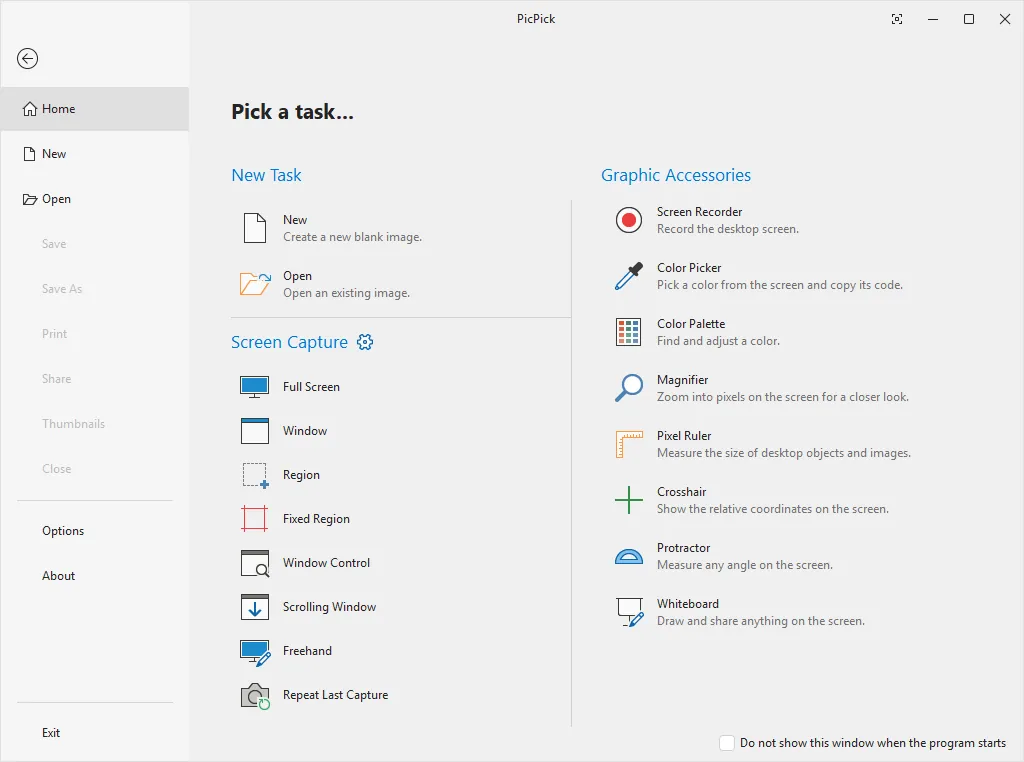
PicPick captures the full screen, the active window, a window control, a scrolling window, a fixed or freehand region, with hotkeys, delayed capture and auto-save. It also records the screen, a window or a region with system audio and microphone. Captures open in an editor with text, arrows, shapes, callouts, number stamps, blur, mosaic, frames and watermarks.
From the tray you get design tools: a color picker with HEX and RGB output, a color palette, pixel ruler, magnifier, crosshair, protractor and an on-screen whiteboard. Results can be saved, printed, inserted into Office apps or sent to cloud storage, FTP or email. PicPick is free for personal, non-commercial use with all tools; a license is needed for business use.
What it does well
- Screen capture. Full screen, window, scrolling window, region, freehand and delayed capture.
- Screen recording. Records screen, window or region with system audio and microphone.
- Image editor. Annotate with text, arrows, callouts, stamps, blur and watermarks.
- Design tools. Color picker, pixel ruler, magnifier, crosshair and protractor.
- Sharing. Send to Dropbox, Google Drive, OneDrive, FTP, email or Office apps.
Who it is for
Good fit
Home users, bloggers and designers who want capture, recording, editing and measuring tools in one program.
Look elsewhere
Business use without a license, and users who only need a quick, lightweight capture tool.
Pros and cons
Pros
- Capture, recording and editor in one app
- Scrolling capture
- Handy color picker and pixel ruler
- All tools included in the free version
Cons
- Free only for personal, non-commercial use
- Large download for a screenshot tool
- Closed source
How to install PicPick
Download the free version and run the installer. PicPick starts in the tray; check the hotkeys in its options so they do not clash with other screenshot tools. A portable version is linked on the download page.
Questions about PicPick
Is PicPick free?
Yes, for personal, non-commercial use, with all tools included. Business or commercial use requires a license.
Can PicPick record the screen?
Yes. It records the full screen, a window or a region with system audio and microphone.
What is the difference between free and licensed PicPick?
The tools are identical; the license grants the right to use PicPick commercially.


