

Our verdict: pgAdmin 4 is the standard free tool for managing PostgreSQL servers and covers almost every object and setting PostgreSQL has. It is the safe pick for administration tasks such as roles, backups and maintenance. The browser-based interface feels slower and busier than native clients, and it supports only PostgreSQL.
About pgAdmin 4
pgAdmin 4 is the administration and development platform for PostgreSQL, maintained by the pgAdmin Development Team and released under the PostgreSQL License. The Windows installer includes both a desktop runtime and the web application, so it opens in its own window but can also run as a server for several users.
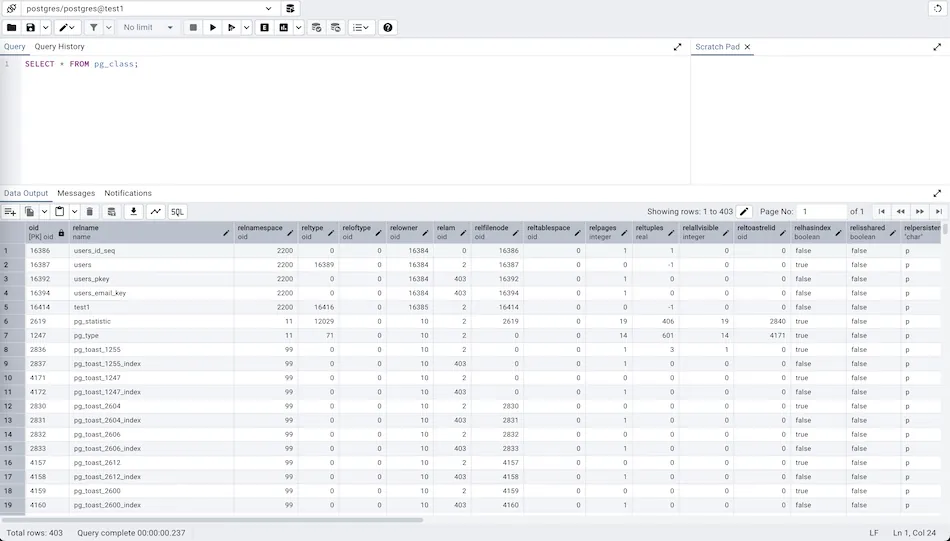
A tree on the left lists servers, databases, schemas, tables, functions, roles and other objects, and dialogs let you create or change each one without writing SQL. The Query Tool runs SQL with syntax highlighting, autocompletion and graphical EXPLAIN plans. Dashboards show sessions, locks and activity, and the ERD tool draws diagrams of existing schemas.
What it does well
- Object browser. Create, edit and drop databases, tables, views, functions, roles and other objects through dialogs.
- Query Tool. SQL editor with autocompletion, editable result grid and graphical EXPLAIN plans.
- ERD tool. Generates entity-relationship diagrams from a schema and produces SQL from diagrams.
- Backup and restore. Graphical front end to pg_dump and pg_restore, plus maintenance tasks like VACUUM.
- Server dashboards. Live graphs of sessions, transactions, locks and server activity.
Who it is for
Good fit
PostgreSQL developers and administrators who need full control of servers, roles and objects.
Look elsewhere
People using MySQL, SQLite or other databases, or anyone wanting a light, fast native client.
Pros and cons
Pros
- Official, free and open source
- Covers nearly every PostgreSQL object and setting
- Graphical EXPLAIN plans and ERD tool
- Can run as a desktop app or a web server
Cons
- PostgreSQL only
- Web-based interface feels slower than native database clients
How to install pgAdmin 4
Run the 64-bit installer; it needs Windows 10 or later. On first launch, set a master password, which pgAdmin uses to protect saved server passwords. Then right-click Servers, choose Register, and enter the host, port, database and user of your PostgreSQL server.
Questions about pgAdmin 4
Is pgAdmin free?
Yes. pgAdmin 4 is free and open source under the PostgreSQL License, with no paid edition.
Does pgAdmin install PostgreSQL?
No. pgAdmin is only a management tool. You install the PostgreSQL server separately and then connect to it.
What is the master password in pgAdmin?
It is a password you set on first launch to encrypt the server passwords that pgAdmin saves.


