

Our verdict: ScreenToGif is the easiest way to make a short animated GIF of something on your screen. Its strength is the editor: you can delete, crop and annotate individual frames before saving. It is meant for short clips, not long screen recordings.
About ScreenToGif
ScreenToGif is developed by Nicke Manarin and released under the Microsoft Public License. It runs on Windows only and is also available from the Microsoft Store.
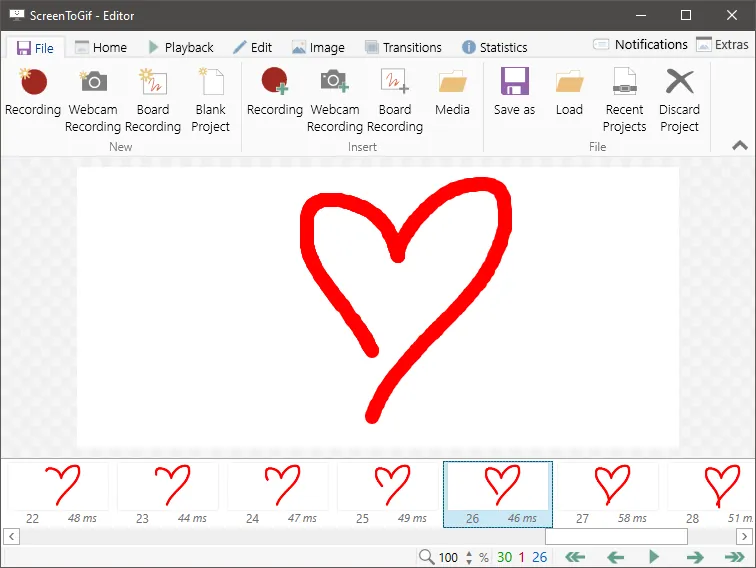
You place a recording frame over any part of the screen, or record your webcam or a drawing board. Afterwards the editor shows every frame, so you can remove mistakes, change delays, crop, add captions, arrows and transitions, and then save as GIF, APNG, video, PSD or a series of images.
What it does well
- Screen, webcam and sketchboard. Three recorders for screen regions, webcam feed and freehand drawings.
- Frame-by-frame editor. Delete, reorder and retime individual frames before saving.
- Annotations. Add captions, free text, arrows, shapes, watermarks and progress bars.
- Many export formats. Save as GIF, APNG, MP4 and other video formats, PSD or PNG images.
- Size optimization. Encoders and settings to reduce colour count and GIF file size.
Who it is for
Good fit
Developers, support teams and writers who need short animated demos for docs, bug reports or chats.
Look elsewhere
People who want to record long tutorials, gameplay or audio.
Pros and cons
Pros
- Very simple recording
- Powerful frame editor
- Many export formats
- No watermark or ads
Cons
- Windows only
- Not suited to long recordings or audio
- Video export needs FFmpeg as an extra download
How to install ScreenToGif
Download the x64 installer, which includes everything needed to run. The Light installers on the same page are smaller but need the .NET 9 Desktop Runtime. To export MP4 and other video formats, point ScreenToGif to FFmpeg in Options; it offers to download it for you.
Questions about ScreenToGif
Is ScreenToGif free?
Yes. ScreenToGif is open source under the Microsoft Public License with no paid version or watermark.
Can ScreenToGif save MP4 video?
Yes. After you set up FFmpeg in Options, it exports MP4 and other video formats in addition to GIF and APNG.
Does ScreenToGif record sound?
No. It is designed for silent animations; use OBS Studio or ShareX if you need audio.


