

Our verdict: VeraCrypt is the standard free tool for encrypting files, USB drives and whole disks on Windows, macOS and Linux. It is strong and well audited, but it expects you to understand what you are doing. If you lose the password, nobody can recover the data.
About VeraCrypt
VeraCrypt continues the discontinued TrueCrypt 7.1a project and is maintained by AM Crypto. It fixes many TrueCrypt weaknesses, for example by using hundreds of thousands of key derivation iterations where TrueCrypt used one or two thousand.
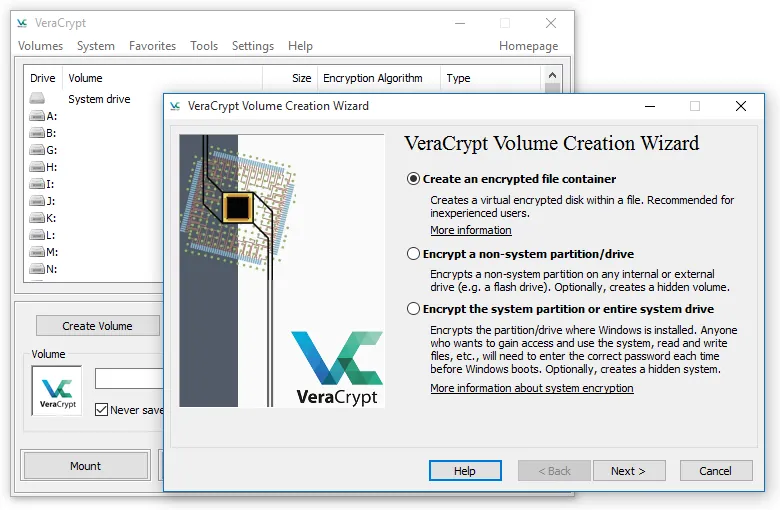
You can create an encrypted container file that mounts as a normal drive letter, or encrypt a whole partition, USB stick or the Windows system drive with pre-boot authentication. Encryption happens on the fly and can use hardware acceleration on modern processors. Hidden volumes and a hidden operating system provide plausible deniability.
What it does well
- Encrypted containers. A single file that mounts as a drive letter and holds any files you put in it.
- Drive and partition encryption. Encrypts USB sticks, external drives and internal partitions.
- System encryption. Encrypts the Windows drive and asks for a password before Windows starts.
- Hidden volumes. A second volume inside the first, revealed only by its own password.
- PIM and keyfiles. Raise key derivation strength with a custom PIM and require keyfiles to unlock.
Who it is for
Good fit
People who need to protect files on laptops, USB drives or shared PCs with strong encryption.
Look elsewhere
Users who want simple cloud-folder encryption or password recovery if they forget the password.
Pros and cons
Pros
- Strong, publicly audited encryption
- Encrypts files, drives and the system disk
- Works on Windows, macOS and Linux
- Hidden volumes for plausible deniability
Cons
- Interface and options like PIM and keyfiles take time to learn
- A lost password means lost data
How to install VeraCrypt
Download the EXE installer for Windows from the official Downloads page and choose Install. Start with a small encrypted file container before trying system encryption. Back up important data first and store the password safely, because a lost password cannot be recovered.
Questions about VeraCrypt
Is VeraCrypt free?
Yes. It is open source and free to use, funded by donations.
Can VeraCrypt open old TrueCrypt volumes?
The current version cannot mount TrueCrypt volumes. The VeraCrypt site offers version 1.25.9 for users who still need TrueCrypt format support.
What happens if I forget my VeraCrypt password?
The data cannot be decrypted. There is no back door or recovery service.


