

Our verdict: WinSCP is the most capable free SFTP client for Windows. It covers everyday uploads with drag and drop, and also folder synchronization, scripting and a .NET library for automation. It is Windows-only, and the main release is still a 32-bit build.
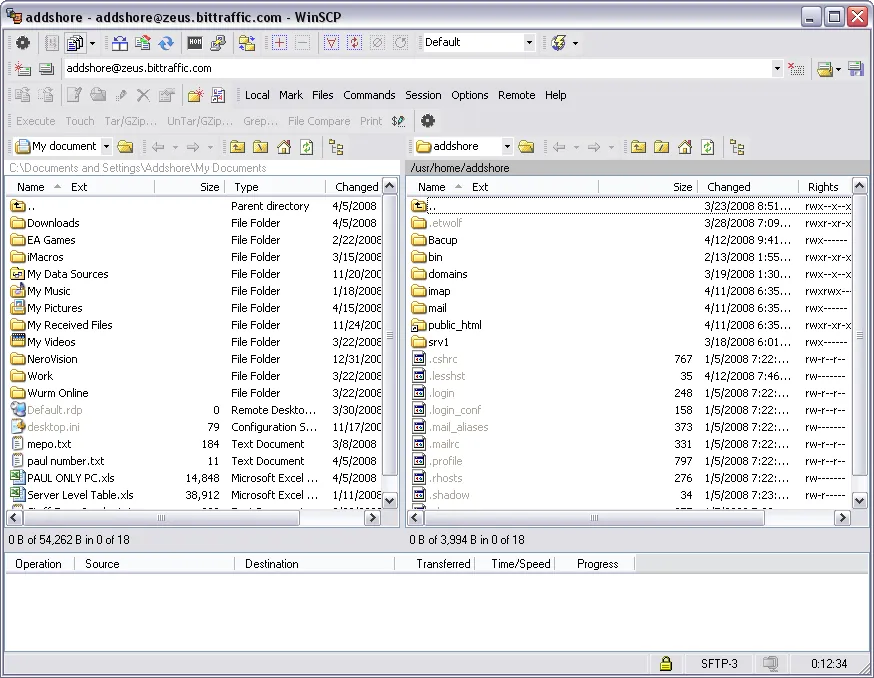
About WinSCP
WinSCP is developed by Martin Přikryl and has been open source under the GPL for many years. Its main job is copying files between your PC and a server over SFTP, SCP, FTP or FTPS, WebDAV or Amazon S3-compatible storage.
You can choose a Commander interface with local and remote panes side by side, or an Explorer-style interface. WinSCP shares site settings with PuTTY and works with Pageant for SSH key authentication.
What it does well
- Many protocols. SFTP, SCP, FTP and FTPS, WebDAV and S3 in one client.
- Two interfaces. Commander layout with two panes or an Explorer-like single pane.
- Synchronization. Keeps local and remote folders in sync, semi or fully automatically.
- Scripting and .NET assembly. Automates transfers from batch files, PowerShell or your own programs.
- Integrated editor. Edit remote files directly; changes upload when you save.
Who it is for
Good fit
Web developers, admins and anyone who uploads files to servers or hosting accounts.
Look elsewhere
Mac or Linux users, or people who need a full interactive terminal (use PuTTY or Windows Terminal for that).
Pros and cons
Pros
- Supports SFTP, FTP, WebDAV and S3
- Folder synchronization
- Powerful scripting and automation
- Works with PuTTY keys and Pageant
Cons
- Windows only
- Main release is 32-bit; the 64-bit build is still experimental
How to install WinSCP
Download the installer from winscp.net. During setup you choose the Commander or Explorer interface; you can switch later. A portable version and a Microsoft Store version are listed on the official download pages. Set a master password if you save site passwords.
Questions about WinSCP
Is WinSCP free for business use?
Yes. WinSCP is licensed under the GPL, which allows use for any purpose, including commercial.
What is the difference between SFTP and FTP in WinSCP?
SFTP runs over SSH and encrypts everything, including passwords. Plain FTP sends data unencrypted, so use SFTP or FTPS when the server supports it.
Can WinSCP keep a local folder and a server in sync?
Yes. Use the Synchronize or Keep Remote Directory up to Date functions, or script it for scheduled jobs.


.png)