

Our verdict: WizTree is the fastest way to find out what is filling a drive. On NTFS drives it reads the Master File Table directly, so a full scan usually takes seconds rather than minutes. It is free at home, but businesses need a paid license.
About WizTree
WizTree is made by Antibody Software in New Zealand. Instead of walking through every folder, it reads the drive's Master File Table, the same trick the Everything search tool uses. Non-NTFS drives and network shares are scanned the normal, slower way.
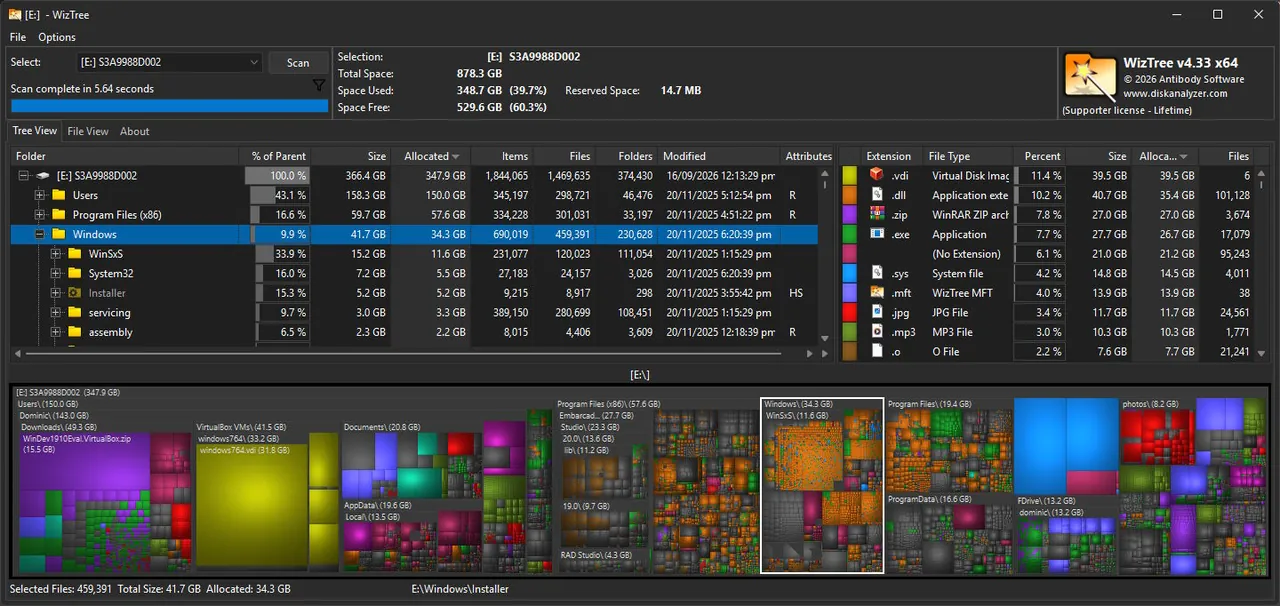
Results appear as a folder tree sorted by size, a list of the largest files and a colored treemap. WizTree counts hard-linked files only once, so its totals match what Windows reports.
What it does well
- MFT scanning. Reads the NTFS file table directly for very fast scans of whole drives.
- Treemap. Shows every file as a block sized by disk usage, so space hogs stand out.
- Largest files list. Lists the biggest files on the drive across all folders.
- Duplicate finder. Finds duplicates by name and size or by name, size and date.
- CSV and image export. Exports file lists and treemap images, also from the command line.
Who it is for
Good fit
Anyone whose drive is suddenly full and who wants an answer in seconds.
Look elsewhere
Business use without buying a license, or users who need a fully open-source tool.
Pros and cons
Pros
- Extremely fast scans on NTFS drives
- Accurate totals with hard links
- Duplicate finder and CSV export
- Installer and portable versions
Cons
- Commercial use requires a paid supporter code
- Duplicate finder compares names and sizes, not file contents
- Shows a Donate button unless you enter a supporter code
How to install WizTree
Download the installer or portable ZIP from diskanalyzer.com. To update, run the newer installer over the old version. Choose a drive and click Scan; be careful when deleting anything inside the Windows or Program Files folders.
Questions about WizTree
Is WizTree free?
Yes, for personal use. Using it commercially requires a supporter code license, priced by organization size.
Why is WizTree faster than WinDirStat?
On NTFS drives WizTree reads the Master File Table directly instead of opening every folder one by one.
Can I trust WizTree's duplicate results?
Use them as a starting point. WizTree matches names and sizes but does not compare file contents, so check before deleting.


