

Our verdict: Comfy Desktop is the easiest way to run ComfyUI locally: it sets up Python, PyTorch and GPU libraries for you and keeps them updated. You get the full node editor with thousands of community extensions. In practice it needs a dedicated NVIDIA or AMD graphics card with plenty of VRAM, and models take a lot of disk space.
About Comfy Desktop
Comfy Desktop is the official desktop launcher for ComfyUI, the open-source node-based engine for generative AI, built by Comfy Org. Each installation comes with its own relocatable Python and prebuilt PyTorch, so there is no manual pip or CUDA setup, and you can run several independent installs side by side.
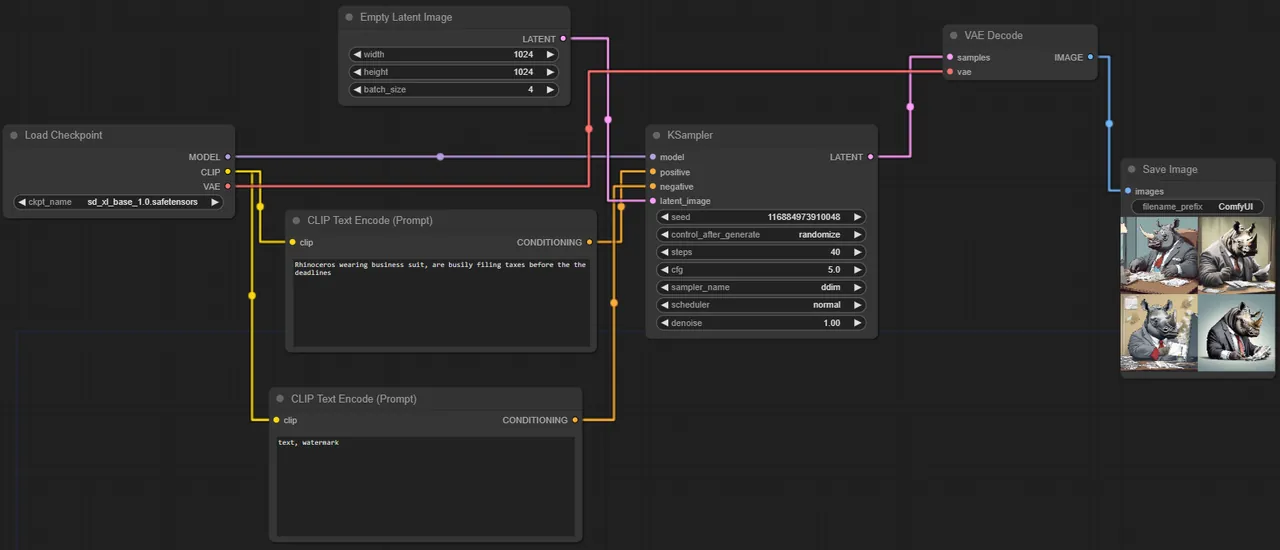
Inside, you build workflows by connecting nodes that load models, encode prompts and generate images or video. Open models such as Flux, Wan and LTX run on your own hardware, and ComfyUI Manager installs community extensions. On first launch you can also choose Comfy Cloud, the paid hosted option, instead of a local install.
What it does well
- One-click local setup. Installs an isolated Python with PyTorch and GPU libraries prebuilt.
- Node-based workflows. Control every step of image and video generation with connected nodes.
- Multiple installs. Run several independent ComfyUI setups from one launcher.
- Extension manager. ComfyUI Manager installs and updates community custom nodes.
- Automatic updates. The desktop app checks for and installs its own updates.
Who it is for
Good fit
Artists and tinkerers with a dedicated GPU who want full local control over AI image and video models.
Look elsewhere
PCs without a dedicated graphics card, small SSDs, and people who want a simple prompt box.
Pros and cons
Pros
- Free and open source
- No manual Python or CUDA setup
- Full ComfyUI node editor and extensions
- Runs offline once models are downloaded
Cons
- Needs a dedicated NVIDIA or AMD GPU for usable speed
- Models consume a lot of disk space
- Node workflows are complex for beginners
How to install Comfy Desktop
Run the NSIS installer from comfy.org. On first start choose a local install rather than Comfy Cloud if you want to run models on your PC. Plan for at least 4.85 GB per installation before models; model files often add tens of gigabytes. Uninstalling the app keeps your installs, models and outputs, which must be deleted separately.
Questions about Comfy Desktop
Is Comfy Desktop free?
Yes. The app is open source under the AGPL v3 and local use is free. Comfy Cloud, the hosted GPU service, is a separate subscription with a small free trial.
Do I need a GPU for Comfy Desktop?
In practice, yes. Comfy Org strongly recommends a dedicated NVIDIA or AMD GPU, and more VRAM allows bigger models. Without one, models run on the CPU and generation is far slower.


.png)