PowerToys — Free Windows Utilities

By Microsoft · Utilities
  • Open source
  • Free
  • Utilities
Download PowerToys Direct download from github.com Official download page Link checked October 19, 2026

Our verdict: PowerToys is Microsoft's free toolbox for power users. It adds features many people expect Windows to have already, such as window zones, bulk file renaming and a system-wide color picker. You turn on only the tools you need.
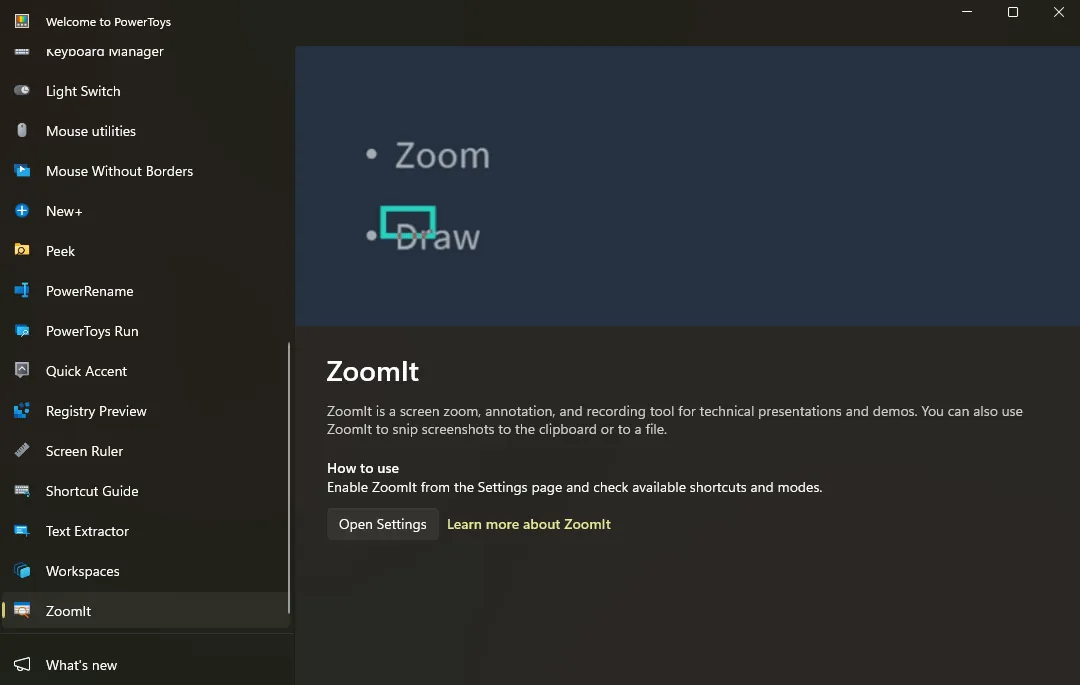
PowerToys settings on Windows 11 with the list of utilities and ZoomIt
PowerToys settings on Windows 11 with the list of utilities and ZoomIt · Screenshot: VulcanSphere, MIT, via Wikimedia Commons

About PowerToys

PowerToys is developed by Microsoft as an open-source project on GitHub. Each tool can be turned on or off separately in the PowerToys settings window, so it does not change Windows until you choose to.

Updates arrive often and new tools appear regularly. The release notes on GitHub list what changed in each version.

What it does well

  • FancyZones. Snap windows into custom layouts, great for wide or multiple monitors.
  • PowerRename. Bulk rename files with search and replace, including regular expressions.
  • Color Picker. Pick any color on screen and copy it as HEX, RGB and more.
  • Text Extractor. Copy text from any part of the screen with OCR.
  • Keyboard Manager. Remap keys and shortcuts without editing the registry.

Who it is for

Good fit

Power users, developers and people working with several windows at once.

Look elsewhere

Users who want Windows to stay exactly as it is out of the box.

Pros and cons

Pros

  • Official Microsoft tool
  • Many useful utilities in one app
  • Each tool can be turned off
  • Frequent updates

Cons

  • Windows only
  • Runs in the background
  • Some tools overlap with built-in Windows features

How to install PowerToys

The download button gets the x64 installer for most computers; ARM64 and per-user installers are on Microsoft's GitHub releases page. PowerToys is also available in the Microsoft Store. After installing, open PowerToys and enable the tools you want.

Questions about PowerToys

Is PowerToys safe?

Yes. It is made by Microsoft and published on Microsoft's official GitHub and in the Microsoft Store.

Does PowerToys slow down my PC?

It runs in the background, but disabled tools do not load. Keep only the tools you use turned on.

Does PowerToys work on Windows 10?

Yes. It supports both Windows 10 and Windows 11.

Download PowerToys from github.com/microsoft ExeDepot does not host this file. The download starts from the developer's server, github.com. Other versions are on the official download page.

Alternatives to PowerToys

  • Everything File Search Tool

    Finds any file on your PC by name as you type.

    voidtools (David Carpenter) · Freeware · voidtools.com
  • Fluent Search Desktop Search and Launcher

    Searches files, apps, browser tabs, open windows and more from one hotkey box on Windows.

    Adir Hudayfi (Blast Apps) · Freeware · fluentsearch.net
  • Wox App Launcher

    Keyboard launcher for apps, files and web searches, extensible with Node.js and Python plugins.

    Wox Launcher project (qianlifeng and contributors) · Open source · github.com/Wox-launcher
  • Flow Launcher App Launcher

    Keyboard launcher for Windows: press Alt+Space to open apps, find files, search the web and run commands.

    Flow Launcher team · Open source · flowlauncher.com

Similar to PowerToys All utilities apps

  • Listary File Search and Launcher

    Instant file search and app launcher for Windows with Quick Switch for Open and Save dialogs.

    Little Carved · Freeware · listary.com
  • LockHunter File Unlocker

    Shows which process locks a file and lets you unlock, delete or rename it.

    Crystal Rich Ltd · Freeware · lockhunter.com
  • TeraCopy File Copy Utility

    Replaces the Windows copy dialog with verified, resumable transfers that skip problem files.

    Code Sector · Freeware · codesector.com
  • QuickLook File Preview Tool

    Preview any file in File Explorer by pressing Space, like Quick Look on macOS.

    QL-Win and contributors · Open source · github.com/QL-Win