Kdenlive — Free Video Editor

By KDE · Video
  • Open source
  • Free
  • Video
Download Kdenlive Direct download from download.kde.org Official download page Link checked October 19, 2026

Our verdict: Kdenlive is a full-featured free video editor that feels closer to traditional editing software than most free options. It offers multitrack editing, proxy clips, keyframed effects and speech-to-text subtitles. It asks for some patience while you learn its panels.
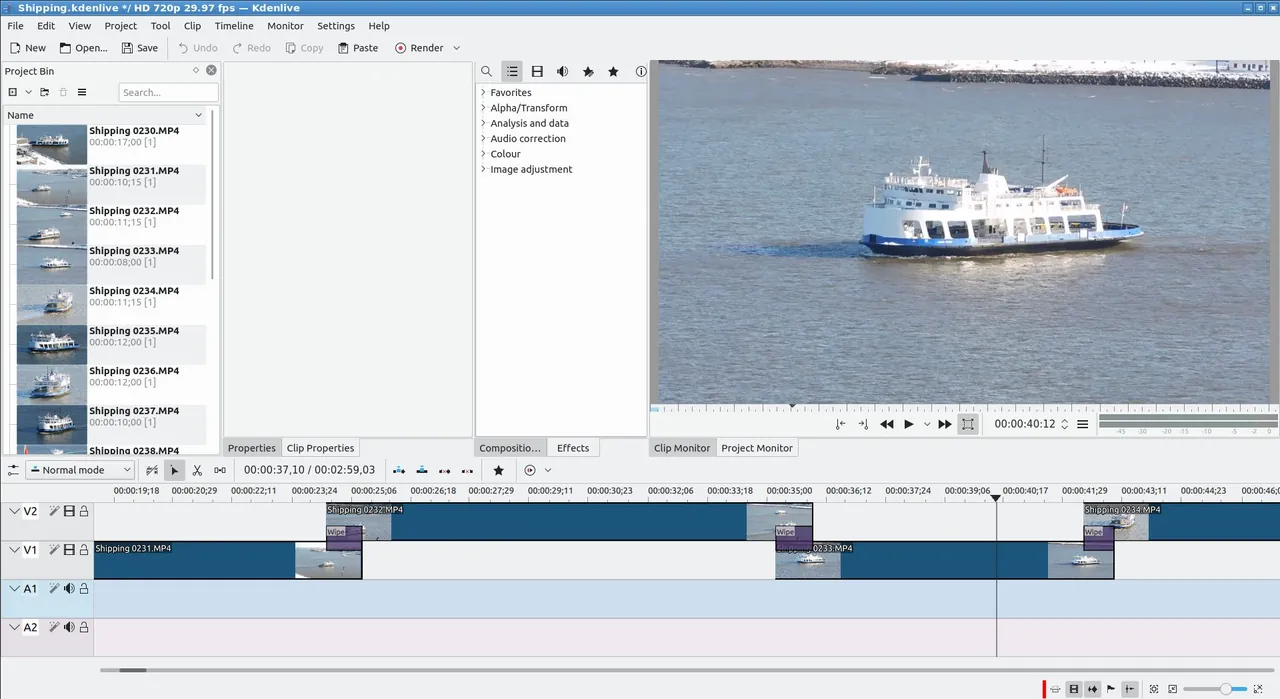
Kdenlive project with clips in the bin, a monitor and the timeline
Kdenlive project with clips in the bin, a monitor and the timeline · Screenshot: KDE, GPL, via Wikimedia Commons

About Kdenlive

Kdenlive is developed by the KDE community and, like Shotcut, is built on the MLT framework. It has a long history on Linux and official builds for Windows and macOS.

Its interface follows a classic editing layout: project bin, monitors, effects and a multitrack timeline. People who know other editors usually find their way around quickly.

What it does well

  • Multitrack timeline. Unlimited video and audio tracks with standard editing tools.
  • Proxy clips. Edits with lighter copies of large files for smooth playback.
  • Effects and keyframes. Color grading, transforms and transitions with keyframes.
  • Titles. Built-in title editor for text and simple graphics.
  • Speech-to-text subtitles. Generates subtitles from speech with an optional model.

Who it is for

Good fit

Hobbyists and creators who want a traditional editing layout without paying.

Look elsewhere

Users who want a minimal editor with only a few buttons.

Pros and cons

Pros

  • Traditional editing layout
  • Proxy clips
  • Automatic subtitles
  • No watermark

Cons

  • Many panels to learn
  • Speech-to-text needs an extra download

How to install Kdenlive

Download the Windows installer or portable version from kdenlive.org. Enable proxy clips in project settings if you edit 4K or phone footage on a modest PC.

Questions about Kdenlive

Is Kdenlive free?

Yes. It is open source with no paid version or watermark.

Kdenlive or Shotcut: which is better?

Both are free and capable. Kdenlive feels more like classic editing software, while Shotcut is lighter and simpler to start with.

Can Kdenlive add subtitles automatically?

Yes. Its speech-to-text feature generates subtitles after you install a speech model.

Download Kdenlive from kdenlive.org ExeDepot does not host this file. The download starts from the developer's server, download.kde.org. Other versions are on the official download page.

Alternatives to Kdenlive

  • Shotcut Video Editor

    Open-source timeline video editor that exports without a watermark.

    Meltytech · Open source · shotcut.org
  • DaVinci Resolve Video Editor

    Professional editing, color grading, effects and audio post in one app, free up to Ultra HD 60 fps.

    Blackmagic Design · Freeware · blackmagicdesign.com
  • OpenShot Video Editor

    Beginner-friendly video editor with keyframe animation, transitions and title templates.

    OpenShot Studios · Open source · openshot.org
  • CapCut Video Editor

    Easy desktop video editor from ByteDance with templates, auto captions and many Pro-only extras.

    ByteDance (CapCut) · Freeware · capcut.com

Similar to Kdenlive All video apps

  • Wondershare Filmora Video Editor

    Beginner-friendly video editor with templates and AI tools; free exports carry a watermark.

    Wondershare · Shareware · filmora.wondershare.com
  • Adobe Premiere Pro Video Editor

    Industry-standard video editor in Creative Cloud; 7-day free trial, then a monthly subscription.

    Adobe · Free trial · adobe.com
  • Pinnacle Studio Video Editor

    Consumer video editor with masking, color grading and multicam; 15-day free trial, then a one-time license.

    Corel · Free trial · pinnaclesys.com
  • Corel VideoStudio Video Editor

    Beginner-friendly video editor with templates and effects; 30-day trial, then a one-time license.

    Corel · Free trial · videostudiopro.com